
A CRM follow-up cadence is a structured sequence of touches (emails, calls, texts, social messages) with fixed timing, defined channels, and clear exit rules, all managed inside a CRM so no lead falls through the cracks. Most reps invent their own rhythm on the fly. This is the problem it fixes.
A solid starter cadence for a fresh inbound lead looks like this:
- Minute 5-15: Automated email acknowledging the inquiry
- Same day (within hours): Phone call
- Day 2: Follow-up email with specific value (pricing, case study, demo link)
- Day 4: Second call attempt plus voicemail
- Day 7: LinkedIn connection or message
- Day 10: Value-add email (testimonial, comparison, FAQ answer)
- Day 14-21: Breakup email
Pro Tip: Set a first-touch service-level agreement of very rapid response for inbound leads. Speed to first contact is one of the strongest predictors of whether a lead ever turns into a real conversation.
Enroll the lead the moment it hits your CRM, and don’t wait for a rep to notice it in a queue. The system should fire the first email automatically and create a call task before the lead’s interest cools off.
Key Takeaways
A CRM follow-up cadence works when speed, spacing, and exit rules are enforced automatically rather than left to individual rep memory.
| Point | Details |
|---|---|
| Speed beats volume | Contact new leads within minutes; faster first touches raise qualification odds more than extra touches do. |
| Exit rules are mandatory | Pause every sequence the moment a lead replies or books a meeting to avoid embarrassing overlap. |
| Mix channels by purpose | Use email for information, calls for conversation, SMS for reminders, and LinkedIn for a human touch. |
| Measure before you expand | Start with one cadence, track reply and meeting-booking rates, then iterate with A/B tests. |
| Loturn connects records | Loturn’s dealer CRM ties customer follow-up to per-vehicle profit data, so dealership reps work from one connected system instead of separate tools. |
Table of Contents
- What Is a CRM Follow-Up Cadence and How Does It Run Operationally?
- Why Does Follow-Up Speed and Consistency Actually Move Revenue?
- What Are the Core Elements Every Cadence Needs?
- What Do Sample Cadence Templates Look Like Day by Day?
- How Do You Configure a CRM to Run Cadences Without Errors?
- What Metrics Show Whether a Cadence Is Working?
- What Mistakes Break a Cadence Before It Even Starts?
- How Can Independent Used-Car Dealers Apply This to Their CRM?
- What separates a cadence that works from one that just looks busy on paper
- Where Loturn Fits Into Your Dealership’s Follow-Up Process
- Sources
- FAQ
What Is a CRM Follow-Up Cadence and How Does It Run Operationally?
A CRM follow-up cadence only works if the mechanics behind it are solid. Cadences don’t run on good intentions. They run on triggers, branches, and exit conditions configured correctly inside the platform.
Here’s the sequence of events from lead creation to sequence completion:
- A trigger fires enrollment. A form fill, a trade show scan, an inbound call, or a manual add from a rep all start the clock. The CRM should timestamp this moment because it becomes your speed-to-contact baseline.
- Automated steps fire on schedule. Emails and reminders go out without a human touching them. Calls and personalized LinkedIn messages stay manual, showing up as tasks assigned to the right rep.
- Branching logic reads behavior. A lead who opens three emails but never replies might jump to a more direct message. A lead who clicks a pricing link might get accelerated straight into a call task.
- Pause-on-reply kicks in. The moment a lead responds, books a meeting, or asks to be removed, the sequence needs to stop. Nothing kills a deal faster than an automated “just checking in” email landing five minutes after someone already said yes to a call.
- The record updates itself. Every send, open, click, call log, and stage change writes back to the CRM, so pipeline reports and forecasts reflect what’s actually happening instead of what a spreadsheet said last week.
Automation standardizes this whole process by sending timed messages, creating call tasks, pausing sequences on reply, and routing high-score leads to your best closers instead of leaving them in a general queue. The trigger and exit logic matter as much as the messages themselves. A cadence with great copy but no exit rules will keep emailing a customer who already bought.
Pro Tip: Build a “meeting booked” exit trigger before you build anything else. It’s the single rule that prevents the most embarrassing automation failures.
Why Does Follow-Up Speed and Consistency Actually Move Revenue?
Contacting a lead within minutes of the request materially raises the odds of a real conversation compared with waiting hours or days. That’s not a minor scheduling detail. It’s the difference between catching someone while they’re still comparing options and catching them after they’ve already booked a call with someone else.

Consistency compounds that advantage. A cadence run the same way every time, with the same spacing and channel order, produces data you can actually trust. Ad-hoc outreach where every rep improvises their own timing gives you noise instead of a pattern to learn from.
There’s a second, quieter benefit: onboarding. A new rep who inherits a documented cadence doesn’t need six months to develop instincts about “when to call back.” They follow the sequence, and the sequence carries the institutional knowledge. Funnel hygiene improves too, because leads either progress, respond, or exit cleanly, rather than sitting in a rep’s memory as “someone I should probably call again.”
Forecasting gets more honest when cadence data feeds it. If you know your typical inbound lead responds by day 4 or not at all, you can flag stalled deals early instead of discovering the problem at quarter’s end.
What Are the Core Elements Every Cadence Needs?
Every cadence, regardless of industry or deal size, breaks down into five structural pieces. Skip one and the whole sequence gets fragile.
Channel mix. Email carries the informational weight (pricing, resources, proof points). Calls handle anything that needs a real conversation or objection handling. SMS works for time-sensitive nudges like meeting reminders, not cold outreach. LinkedIn adds a human face to an otherwise faceless inbox. Combining channels matters because people respond differently depending on where the message lands — someone who ignores five emails might answer a LinkedIn message the same afternoon.
Timing patterns. Front-load the first hour or day, then space touches out gradually. A common B2B pattern compresses the first three touches into 48 hours, then stretches spacing to 2-4 days between remaining steps. Cramming ten touches into one week reads as desperate. Spacing them over six weeks reads as forgotten.
Triggers and branching. Score-based acceleration moves a hot lead into a faster track automatically. Behavioral branches redirect based on opens, clicks, or silence. Pause rules stop everything the instant a human replies or books time.
Ownership and task creation. When automation reaches a step that needs a human (a call, a personalized note), it should generate a task with a clear owner and deadline, not just a vague notification buried in an activity feed.
Message purpose per touch. Every single message in the sequence needs a job:
- Touch 1: Introduction and acknowledgment
- Touch 2-3: Value (what problem you solve, proof it works)
- Touch 4-5: Social proof or comparison content
- Touch 6: Direct call-to-action
- Final touch: Closure (the breakup message)
A cadence where every email just says “following up” in different words has channels and timing but no actual purpose, and prospects can tell.
What Do Sample Cadence Templates Look Like Day by Day?
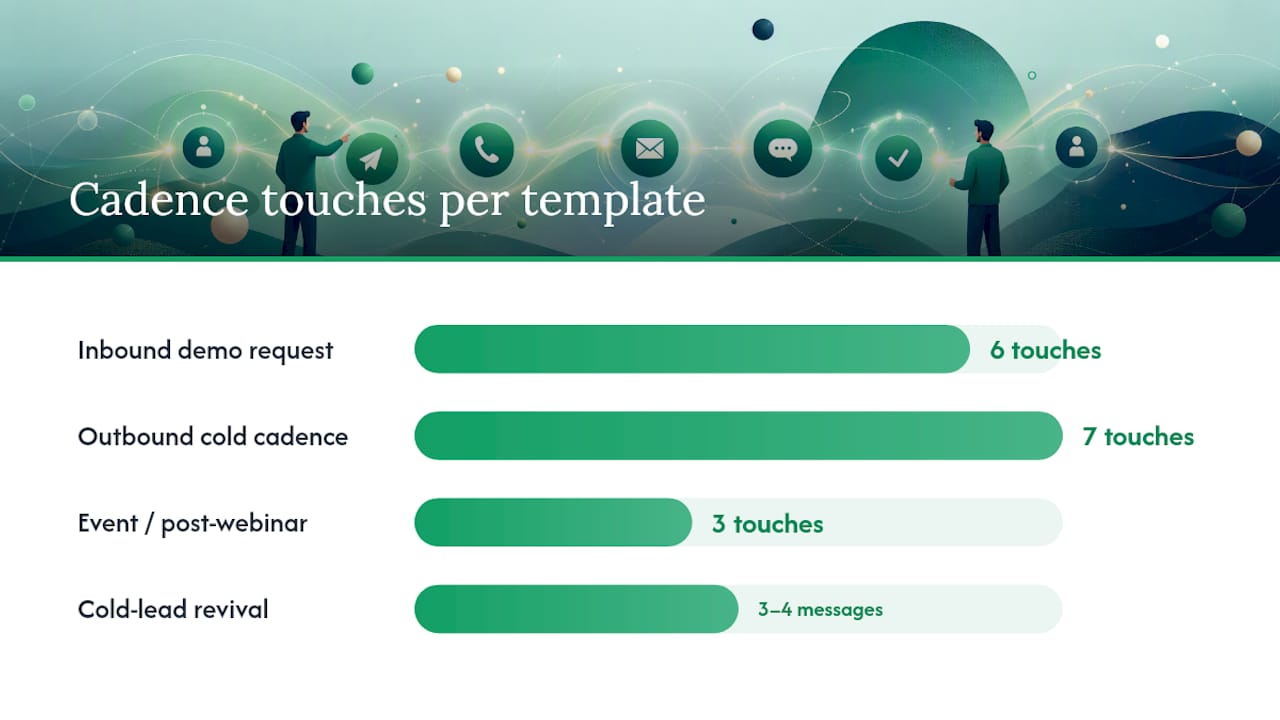
Templates only earn their keep when you can lift them directly into a sequence builder. Here are four built around the situations that come up most in B2B pipelines.
Inbound demo request. The prospect already raised their hand, so speed matters more than persuasion.
| Day | Channel | Purpose |
|---|---|---|
| Day 0 (minutes) | Confirm request, offer scheduling link | |
| Day 0 (same day) | Call | Qualify and book demo |
| Day 2 | Case study relevant to their industry | |
| Day 5 | Call + voicemail | Second attempt if no response |
| Day 8 | Soft touch, share relevant content | |
| Day 12 | Breakup, ask for a simple yes or no |
Outbound cold cadence. No existing signal, so this runs longer and spreads touches wider.
- Day 1: Personalized email referencing a specific trigger (funding, hire, expansion)
- Day 3: Call attempt, no voicemail
- Day 5: LinkedIn connection request with a short note
- Day 8: Email with a case study or relevant statistic
- Day 11: Call with voicemail
- Day 15: Email offering a specific meeting time
- Day 19: Breakup email
Event or post-webinar cadence. Context from the event makes the outreach feel earned rather than random. Reference the specific session or question they asked within the first email, sent inside 24 hours while the event is still fresh in their mind. Follow with a call by day 2, then a resource email by day 5 tied directly to the topic they showed interest in.
Cold-lead revival. Reactivation works best as a short three to four message sequence rather than a full cadence rebuild, and it should start with a data refresh, not a blast to a stale list. Segment by why the lead went cold (price objection, timing, no response) and tailor the first message to that reason. If there’s still no activity after a few quarterly attempts, archive the record instead of running it again.
The breakup email deserves its own note: placing it around day 12-21 depending on deal cycle length tends to prompt a fast reply, because it removes the pressure of an ongoing sales conversation and just asks for a clear answer.
How Do You Configure a CRM to Run Cadences Without Errors?
Getting the sequencing right on paper is one thing. Getting your CRM to execute it reliably, without duplicate calls or emails sent to someone who already replied, is another.
Four features are non-negotiable:
- A sequencing engine that handles timed, multi-step enrollment automatically.
- Branching logic that reroutes leads based on opens, clicks, or inactivity.
- Pause-on-reply that halts the sequence the second a human responds or books a meeting.
- Activity logging that writes every send, call, and reply back to the lead record.
Routing matters just as much as the cadence content. Round-robin assignment spreads inbound leads evenly across a team, priority assignment sends your highest-value leads to your strongest closers, and escalation rules bump a lead to a manager if it sits untouched past a deadline.
Before rolling any new cadence out to the full pipeline, test it on a sandbox account or a small segment of 20-30 leads. Watch for the failure modes that only show up in live conditions: double sends, wrong merge fields, a branch rule that fires on the wrong condition.
Pro Tip: Version your templates the same way you’d version code. Label them by date and iteration (“Inbound v3, March 2026”) so when reply rates shift, you can trace it back to the exact change that caused it.
What Metrics Show Whether a Cadence Is Working?
Four numbers tell you almost everything: speed-to-first-contact, reply rate, meeting-booking rate, and meeting-to-opportunity conversion. Track them per cadence, not just in aggregate, because a template that performs well for inbound leads can fall flat on cold outbound.
- Speed-to-first-contact: Faster first touches consistently correlate with higher qualification rates, so this should sit on every rep’s dashboard, not buried in a monthly report.
- Reply rate per step: Identifies exactly where prospects tune out, so you know which touch to rewrite first.
- Meeting-booking rate: The real test of whether the cadence converts attention into a calendar slot.
- Meeting-to-opportunity rate: Confirms the leads booking meetings actually match your ideal customer profile.
When drop-off spikes at a specific step, that’s your first experiment. Test one variable at a time: touch spacing, channel order, subject lines, or breakup timing. Review cadence performance monthly, and tag deals by which sequence sourced them so attribution doesn’t get muddled when a lead moves between reps.
What Mistakes Break a Cadence Before It Even Starts?
- Sequencing without an intent signal. Blasting six touches at someone who filled out a gated PDF form, with no other context, reads as spam. Match aggressiveness to actual buying signal.
- Missing exit rules. A sequence that keeps emailing after a reply, or after a meeting gets booked, is the fastest way to make a prospect regret responding at all.
- Dirty contact data. Wrong phone numbers and bounced emails burn touches on people who were never reachable. Refresh data before reactivating cold leads rather than assuming the old record is still accurate.
- One-size-fits-all sequencing. A hand-raised demo request and a scraped trade show badge scan are not the same lead, and running them through identical timing wastes the urgency of the first and annoys the second.
How Can Independent Used-Car Dealers Apply This to Their CRM?
Dealers face a version of this problem that’s uniquely unforgiving: a buyer who inquires about a specific vehicle and doesn’t hear back within the hour is often calling the next lot on their list. A car dealer CRM built around per-vehicle and per-customer records lets a dealership personalize that first response with the actual stock number, trim, and price instead of a generic template.
A workable starter cadence for a dealership inbound lead:
- Minutes 0-15: Automated text or email confirming the vehicle is available, with photos
- Same day: Phone call to confirm interest and offer a test drive slot
- Day 2: Follow-up with financing options or trade-in estimate
- Day 5: Check-in call if no test drive booked yet
- Day 10: Final email with a similar vehicle if the original one sold
Encryption and setup speed matter more to dealers than most software buyers realize, since customer financial data (trade-in details, credit applications) flows through the same system as the sales conversation.
A dealership adopting automated follow-up for the first time doesn’t need a complex rollout. It needs a system where the customer record, the vehicle record, and the follow-up schedule already talk to each other, so setup takes days rather than months.
Loturn’s dealer accounting tools tie directly into that same customer record, so a follow-up cadence and a vehicle’s true profit sit in one place instead of two disconnected systems.
What separates a cadence that works from one that just looks busy on paper
The instinct in most sales organizations is to add more touches. More emails, more channels, more frequency, on the theory that persistence eventually wins. The data doesn’t support that. What separates a working cadence from a noisy one is exit discipline, not touch volume.
The conventional advice, “just follow up more,” ignores the fact that a prospect who’s replied, booked a meeting, or gone genuinely cold doesn’t need another email. They need silence, or a different kind of message entirely. Most of the cadences I’ve seen fail aren’t too short. They’re too long, with no branch logic to catch a lead that’s already moved past the point where automated nudges help.
If you’re building your first cadence, resist the urge to design something elaborate. Start with one well-instrumented sequence, measure it honestly for a month, and only then decide whether it needs more steps or fewer. The teams that get this right treat automation as a way to protect a rep’s time for the conversations that actually need a human, not as a way to send more messages per lead. That distinction, protecting attention rather than maximizing volume, is what conventional cadence advice consistently misses.
Where Loturn Fits Into Your Dealership’s Follow-Up Process
Independent dealers juggling spreadsheets for inventory costs and a separate app for customer follow-up end up with the same problem this article just walked through: disconnected systems that make cadence discipline harder than it needs to be. Loturn solves that by putting your CRM follow-up cadence inside the same platform that tracks per-vehicle profit, so a rep responding to an inbound lead can see the actual numbers on that car in the same screen where they log the call.
Setup includes free data importation, so dealers moving from a spreadsheet or another dealer management system don’t lose their existing customer history in the switch. Every record runs on bank-level encryption, which matters once financing details and trade-in paperwork start flowing through the same system as your sales follow-ups. If your current setup makes it hard to know which leads are stalling and which cars are quietly losing money, start a free trial with Loturn and see both problems solved in the same dashboard.
Sources
- Sales Follow-Up Cadence in CRM: Timing rules that prevent deals going cold — HelloGrowthCRM
- Monday
- Pushable
- What Is a Sales Sequence (or Cadence), and How Does It Work in a CRM? — CRM Newspaper
FAQ
What Is a Cadence in a CRM?
A cadence is a pre-built sequence of follow-up steps (emails, calls, texts, social touches) with set timing and exit conditions that the CRM runs automatically once a lead is enrolled.
What Does Follow-Up Cadence Mean in Sales?
It refers to the rhythm and order of contact attempts a rep or system makes with a lead. Getting it right means balancing enough persistence to stay top of mind without becoming spam.
How Do I Set the Right Follow-Up Cadence for My Team?
Start with a single documented sequence, front-load the first day with two or three touches, space remaining touches every 2-4 days, and add a breakup email between day 12 and 21.
What Are the Four Main Types of CRM Software?
CRM platforms generally fall into operational (managing day-to-day sales and support tasks), analytical (mining customer data for patterns), collaborative (sharing customer information across teams), and industry-specific systems built for one vertical, such as Loturn’s platform for used-vehicle dealers.
What Is the Best CRM for Tracking Leads at a Used-Car Dealership?
The best fit is a CRM built specifically for vehicle sales, where lead follow-up connects directly to inventory and per-vehicle profit data rather than living in a separate general-purpose tool.