
The right approach to dealership software onboarding is a dealer-specific, role-based activation that runs parallel testing before cutover and locks in a mutual-action plan between your team and the vendor. That single decision, more than any feature comparison, determines whether your go-live is smooth or a three-week fire drill.
Generic SaaS onboarding checklists don’t work for dealerships because your system has to be mission-critical from minute one. There’s no soft launch where half your deals run on the old system and half on the new one while everyone gets comfortable. A customer walks in, a deal gets structured, and the software either handles it or it doesn’t. That’s why DMS implementations commonly take around 90 days, with process complexity around data migration, OEM integration, and multi-role training driving most of the delay. Dealers who compress that timeline successfully do it by front-loading data prep and running the new system in parallel with the old one before flipping the switch.
Here’s the phase checklist that keeps a dealership software onboarding project on schedule:
- Plan: assign a project owner, name superusers by department, agree on a mutual-action plan with the vendor
- Data: export, clean, and map customer, inventory, and accounting records
- Configure: set up workflows, pricing rules, and integrations before training starts
- Train: run role-based sessions for sales, F&I, service, and parts
- Test: execute a parallel run alongside your existing system
- Go-live: cut over with a rollback plan ready and support coverage staffed for the first 48 hours
Key Takeaways
Dealership software onboarding succeeds when a dealer-specific, role-based activation runs a parallel test before cutover and locks in a mutual-action plan that eliminates dead time between vendor and dealer tasks.
| Point | Details |
|---|---|
| Appoint a project owner | Name someone with real decision-making authority before the project starts, not a figurehead. |
| Clean data before migration | Fix duplicate records and VIN mismatches before export to avoid doubling migration time. |
| Run a parallel test | Compare 3 to 5 days of identical transactions between old and new systems before cutover. |
| Train by role, not by webinar | Use 30-minute, department-specific modules and track adoption metrics in the first two weeks. |
| Choose a dealer-specific platform | Loturn offers free data import assistance and an automotive chart of accounts built for per-car cost tracking from day one. |
Table of Contents
- How Long Does Dealership Software Onboarding Take?
- What Data Needs to Migrate to New Dealership Software?
- Which Integrations and Workflows Come First?
- How Do You Train Staff on New Dealership Software?
- What Does Go-Live Testing Look Like for Dealership Software?
- What Security Checks Should Dealerships Require During Onboarding?
- How Do You Measure Onboarding Success?
- Who Owns What During the Onboarding Project?
- How Loturn Speeds Up Onboarding for Independent Dealers
- What Happens After Go-Live?
- What Actually Makes Dealership Onboarding Succeed
- Make Your Next Onboarding the Last One That Feels Hard
- Sources
- FAQ
How Long Does Dealership Software Onboarding Take?
Timelines vary by system complexity, but most dealerships should plan for somewhere between 30 and 90 days depending on how many integrations and data sources are involved. Some cloud-first providers advertise onboarding in 7 to 10 business days using hosted, pre-configured templates, while more complex DMS switches with heavy OEM integration and legacy data cleanup routinely stretch toward the 90-day mark.
A 30/60/90-day structure gives you a realistic middle ground for most independent dealers switching platforms.
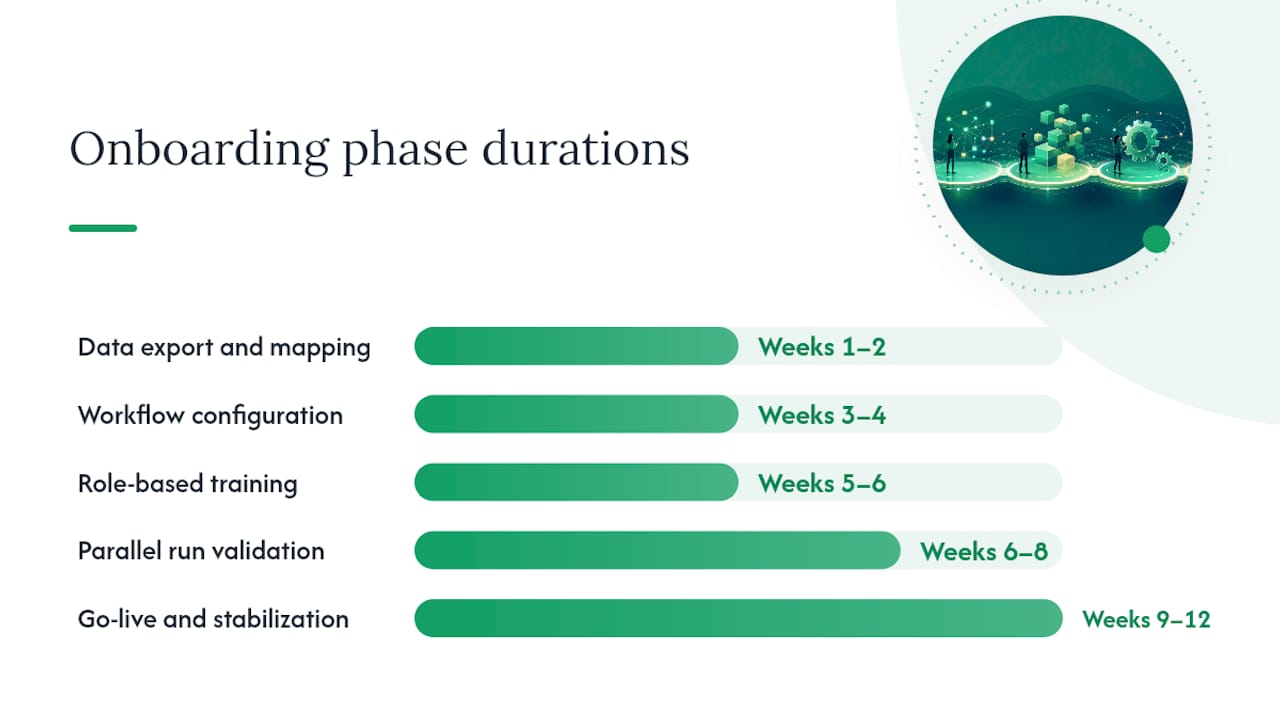
Weeks 1 to 2: Foundation and data. This is where you export legacy data, assign your project owner, and start the mapping work. The vendor’s customer success manager (CSM) should be running technical setup in parallel while your team cleans records. Nothing here should be sequential if you can help it.
Weeks 3 to 4: Configuration and integration testing. Workflows get built, integrations get connected and tested, and your superusers start getting hands-on access in a sandbox environment.
Weeks 5 to 8: Training and parallel run. Role-based training rolls out by department while your team runs the new system alongside the old one, comparing outputs.
Weeks 9 to 12 (if needed): Go-live and stabilization. Cutover happens, support coverage tightens, and you start tracking adoption metrics daily.
| Phase | Timeframe | Runs In Parallel With | Primary Owner |
|---|---|---|---|
| Data export and mapping | Weeks 1 to 2 | Vendor technical setup | Dealer project owner |
| Workflow configuration | Weeks 3 to 4 | Integration testing | Vendor CSM |
| Role-based training | Weeks 5 to 6 | Parallel system run | Superusers |
| Parallel run validation | Weeks 6 to 8 | Live legacy system | Dealer project owner + vendor |
| Go-live and stabilization | Weeks 9 to 12 | First 48-hour support window | Vendor CSM |
The biggest schedule risk isn’t the software. It’s slow stakeholder responses. When a general manager takes five days to approve a chart of accounts mapping, the whole project stalls behind that one decision. Mutual-action plans that assign clear ownership to each task eliminate a lot of that dead time, because nobody’s waiting to find out whose job something was.
Unclean legacy data is the other common culprit. If your inventory records have duplicate VINs or your customer database has three versions of the same contact, migration takes twice as long as it should. Fix that before the clock starts, not during week 2.
- Name a project owner who can make decisions without waiting on a committee
- Build the mutual-action plan before signing anything, not after
- Push data cleanup to start before the official kickoff date
- Schedule superuser training in the same week as sandbox access, not weeks later
What Data Needs to Migrate to New Dealership Software?
Six categories of data move with you every time: customer records, vehicle inventory, service history, parts inventory, vendor and accounts payable records, and general ledger accounting history. Skipping any one of these creates a gap that surfaces weeks after go-live, usually at the worst possible moment, like a customer disputing a service record that never made the jump.

Export formats matter more than people expect. CSV works for most tabular data, but VIN fields, date fields, and currency fields need consistent formatting before they ever touch the new system. A VIN stored as text in one system and as a formula-generated string in another will fail validation silently, and you won’t know until a service advisor pulls up the wrong vehicle history.
| Source Field | Destination Field | Format Notes | Validation Check |
|---|---|---|---|
| Customer name | Contact record | Split first/last, dedupe by phone and email | Row count match pre/post import |
| VIN | Vehicle identifier | alphanumeric, no formulas | Checksum validation against decoded VIN |
| Vehicle cost basis | Per-car cost ledger | Include transport and recon as separate line items | Spot-check 10% sample against paper records |
| Service history | Repair order archive | Preserve date stamps and technician IDs | Cross-reference against parts usage |
| Vendor accounts | AP ledger | Match tax ID and remit-to address | Reconcile against last statement balance |
The most common data problems aren’t exotic. Duplicate customer records from years of manual entry, VINs that got truncated or mistyped somewhere along the way, and service history that lives in a separate system nobody thought to include in scope. The fix for duplicates is usually a dedupe pass matched on phone number and email before import, not after. The fix for VIN mismatches is running every VIN through a decoder check before migration, flagging anything that doesn’t validate.
Pro Tip: Run a sandbox import with a small batch (50 to 100 records) before committing to the full migration. It’s far easier to catch a mapping error in a 100-record test than to unwind it after 40,000 records have already loaded.
Validation should happen at three points: immediately after import (checksum counts matching source row counts), during the sandbox testing phase (spot-checking a random sample against paper or legacy-system records), and during the parallel run (comparing a full day’s reporting output between old and new systems side by side). If your reconditioning and acquisition costs need to reconcile with vehicle acquisition and reconditioning software, that’s the point to check it, not two weeks after go-live when a car’s true cost basis is already in question.
Which Integrations and Workflows Come First?
Prioritize accounting, your existing DMS or DMS bridge, CRM, and floorplan integration before anything else, because those four touch the money on day one. OEM feeds and listing syndication matter too, but a broken accounting sync on day one creates a mess that takes weeks to reconcile, while a delayed listing feed just means a few days of thinner web traffic.
Sales desk workflows should come pre-configured with smart defaults for deal structuring, then get customized for your specific F&I products and lender relationships. Service intake needs to talk to parts ordering in real time, or your advisors end up working from memory about what’s in stock. F&I workflows need the tightest configuration because compliance documentation can’t have gaps.
Here’s the integration priority order most dealers should follow:
- Accounting system sync (chart of accounts, per-car cost tracking)
- DMS or legacy system bridge (for data continuity during transition)
- CRM integration (lead flow and customer follow-up continuity)
- Floorplan interest tracking (curtailment schedules can’t have gaps)
- OEM feeds (warranty claims, incentive data)
- Listing syndication (web platforms, marketplace feeds)
Floorplan financing integrations deserve particular attention because curtailment math runs on a schedule that doesn’t pause for your software transition. If the integration between your new system and your floorplan lender’s reporting breaks, you find out at the worst time: when a curtailment payment is due and nobody can pull the right aging report.
Brittle integrations tend to be the ones nobody tested end-to-end before go-live. Ask your vendor for a written integration test log covering every connected system, and insist on seeing actual test credentials used, not just a verbal “yes, it’s connected.” A checklist here should include confirming API rate limits won’t throttle during month-end reporting, verifying that failed syncs trigger an alert rather than failing silently, and testing what happens when the OEM feed goes down for maintenance.
How Do You Train Staff on New Dealership Software?
Short, role-based modules beat long generic webinars every time. A 30-minute session focused specifically on how a service advisor books a repair order sticks far better than a two-hour walkthrough of every feature in the system, most of which that advisor will never touch.
Automotive tech onboarding process design should mirror how dealership staff actually work: in short bursts between customers, not in extended sit-down training blocks. Train-the-trainer works well here because it multiplies your training capacity without multiplying vendor cost. Pick one superuser per department, get them proficient first, and let them run peer sessions for the rest of their team.
A sample training schedule tied to the activation timeline looks something like this: sales desk training in week 5, F&I training in week 5 (separate session, different pain points), service and parts training in week 6, and a full-dealership refresher session in week 8 right before go-live. Structured training programs that follow a role-based path tend to shorten the ramp time compared to one-size-fits-all sessions.
- Assign one superuser per department before training begins
- Schedule sessions in 30-minute blocks tied to specific tasks, not general overviews
- Track login frequency and task completion rate in the first two weeks post-training
- Watch support ticket themes for repeated confusion points and schedule a quick refresher
Adoption metrics tell you where training gaps exist before they become support tickets. If logins from the parts department are lagging a week after training, that’s a signal, not a coincidence. If the same three questions keep showing up in support tickets, that’s a training module that needs a second pass, not five individual answers.
Pro Tip: Use real transactions in a sandbox environment during training, not sample data. Walking a salesperson through their own last three deals in the new system builds confidence faster than any hypothetical scenario ever will.
What Does Go-Live Testing Look Like for Dealership Software?
User acceptance testing (UAT) should run real-world scenarios across every department before you commit to a hard cutover. A sales desk script might walk through structuring a trade-in deal with a rebate and a service contract attached. An F&I script tests a full deal jacket from credit application through funding. A service script books a repair order, orders a part, and closes it out with correct labor time billed. A parts script processes a special order and reconciles it against the vendor invoice.
Parallel runs of 3 to 5 days give you the clearest signal on whether the new system is ready. Run identical transactions through both systems and compare the output: does the accounting ledger match, does inventory count reconcile, does the customer record look the same in both places? If the numbers match consistently across the parallel window, that’s your acceptance criteria for cutover.
Go-live checklist:
- Confirm data migration is complete and validated against the sandbox test results
- Verify all priority integrations passed their test logs
- Confirm superusers in every department have completed training
- Set rollback triggers in advance (for example: accounting discrepancies over $500, or integration failures affecting more than 10% of transactions)
- Staff extended support coverage for the first 48 hours, including after-hours contact for the vendor CSM
- Set a daily reporting cadence for the first week, shifting to weekly by week 3
Rollback planning isn’t pessimism, it’s insurance. Decide before go-live what conditions trigger a rollback to the old system, and make sure your project owner has the authority to pull that trigger without waiting for a committee vote. The first 48 hours after cutover should have someone watching transaction success rates in real time, not just fielding complaints as they come in.
What Security Checks Should Dealerships Require During Onboarding?
Encryption at rest and in transit, multi-factor authentication, role-based access controls, automated backups, and audit logs are the non-negotiable minimums for any system handling customer financial data and deal paperwork. If a vendor can’t clearly answer how they handle each of these, that’s a red flag worth pursuing before you sign, not after.
Ask your vendor these questions directly during the sales process: How is data encrypted, both stored and in motion? What does the backup schedule look like, and how quickly can data be restored after a failure? Who has access to customer financial records internally, and how granular is your role-based permission system? What’s your audit log retention period?
For dealerships handling card payments, PCI compliance matters at the point of sale integration, and it’s worth confirming which party (dealer or vendor) carries responsibility for that compliance layer. State-level dealer record retention rules vary, so confirm your onboarding plan accounts for however long your state requires you to retain deal jackets and title documents; check with your state dealer licensing authority or a compliance professional for your specific requirements, since retention periods differ by jurisdiction.
- Confirm encryption standards for both stored and in-transit data
- Verify MFA is enforced for all user accounts, not optional
- Ask for a written backup and disaster recovery policy
- Request audit log retention periods and confirm they meet your state’s requirements
- Build security verification into the activation timeline, not as an afterthought after go-live
How Do You Measure Onboarding Success?
Time-to-first-sale on the new system is the single clearest early signal: how many days after go-live before a full deal, from desk to funding, closes cleanly with no manual workarounds? Alongside that, track transaction success rate (the percentage of transactions completing without errors or support intervention), training completion by role, support ticket velocity, and inventory accuracy against your physical count.
A simple KPI dashboard during activation should show these five numbers updated daily for the first two weeks, then weekly through month three. Executives don’t need a fifty-metric report. They need to know: are deals closing, is support ticket volume trending down, and does inventory match reality.
| Cadence | What to Check | Who Reviews It |
|---|---|---|
| Daily (weeks 1 to 2) | Transaction success rate, support ticket volume | Project owner |
| Weekly (weeks 3 to 8) | Training completion by role, inventory accuracy | Department managers |
| Monthly (months 2 to 3) | Time-to-first-sale trend, overall adoption rate | Ownership/leadership |
Inventory accuracy deserves particular attention if you’re managing vehicles across categories like cars, RVs, boats, and trailers, since each category can carry different data fields and reconciliation needs. A dedicated inventory management approach helps catch mismatches before they compound into a bigger reconciliation headache at month-end.
Who Owns What During the Onboarding Project?
A RACI-style breakdown, meaning who is Responsible, Accountable, Consulted, and Informed, prevents the classic onboarding failure where everyone assumes someone else is handling a task. Your dealer project owner should be accountable for the overall timeline and final go/no-go decision. The vendor CSM is typically responsible for technical configuration and integration testing. Department superusers are responsible for validating their own workflows and leading peer training.
| Task | Dealer Project Owner | Vendor CSM | Department Superusers |
|---|---|---|---|
| Data export and mapping | Accountable | Responsible | Consulted |
| Workflow configuration | Consulted | Responsible | Informed |
| Integration testing | Informed | Responsible | Consulted |
| Role-based training | Accountable | Consulted | Responsible |
| Go/no-go decision | Accountable | Consulted | Informed |
Meeting cadence matters more than most project plans account for. Daily standups during the data migration and configuration phases keep small issues from becoming week-long delays. A weekly steering meeting with dealership leadership keeps the project visible without turning into a status-report ritual nobody reads. Name an escalation contact on both sides before you need one, not during a crisis.
- Name a dealer project owner with real decision-making authority, not a figurehead
- Assign a superuser per department before configuration begins, not after training starts
- Hold daily standups during migration weeks, weekly steering meetings throughout
- Confirm the vendor’s escalation contact and response time commitment in writing
How Loturn Speeds Up Onboarding for Independent Dealers
Loturn is built specifically for how independent used-vehicle dealers work, which cuts a lot of the generic-software translation problem out of onboarding. Instead of configuring a broad accounting platform to somehow understand per-car cost tracking, Loturn’s automotive chart of accounts already reflects how dealers think about purchase price, transport, and recon expense against each vehicle.

That specificity shows up directly in onboarding time. Free data import assistance means your team isn’t building mapping templates from scratch, and prebuilt inventory templates cover the categories independent dealers actually carry, cars, RVs, boats, bikes, and trailers, rather than forcing every vehicle type into the same generic field structure.
The Dealer Academy provides departments with role-specific guides they can work through at their own pace, which pairs naturally with the train-the-trainer approach covered earlier. During a typical first four weeks with Loturn, that support looks like this:
- Week 1: Data import assistance for inventory, customer, and accounting records
- Week 2: Sandbox environment setup and initial per-car cost tracking configuration
- Week 3: Role-based training sessions by department using Dealer Academy resources
- Week 4: Sandbox-to-live flip with per-car profit visibility active from the first transaction
Because Loturn tracks cost at the individual vehicle level from day one, dealers get true profit visibility immediately after cutover instead of guessing at margins while the accounting settles.
What Happens After Go-Live?
Onboarding doesn’t end at cutover. The dealerships that get the most value from new software treat the first 90 days after go-live as a tuning period, not a finish line.
Review your workflow configurations at the 30-day mark once real transaction volume has moved through the system. Pricing rules that looked right in configuration often need small adjustments once actual deals expose edge cases nobody anticipated during setup. The same goes for report templates. What looked useful in a sandbox demo sometimes turns out to be the wrong report for how your managers actually make decisions.
Set a recurring quarterly review of your KPI dashboard past the initial 90-day window. Adoption metrics that mattered in week 2 (logins, task completion) become less relevant once the system is habitual. By month four, the metrics that matter shift toward business outcomes: is time-to-close improving, is inventory turning faster, is per-car profit visibility actually changing pricing decisions at the desk.
Retraining isn’t a failure signal. Staff turnover happens, new features roll out, and workflows evolve as your dealership grows. Building a light quarterly refresher into your operating rhythm, even just a 15-minute session per department, keeps skills sharp without requiring a full onboarding redo. Treat your superusers as an ongoing resource, not a one-time training investment. They’re the ones who’ll catch a workflow drifting out of sync with how the business actually runs.
What Actually Makes Dealership Onboarding Succeed
The technical parts of onboarding, the data migration, the integration testing, are rarely what sink a project. What sinks it is silence. A general manager who goes quiet on a decision for a week. A department that nods along in a training session but never actually logs into the sandbox. A vendor CSM who stops showing up to standups once the contract is signed.
I’ve seen more onboarding timelines blow past their target date because of insufficient role training than because of any technical integration failure. Dealerships tend to over-invest in getting the accounting sync right and under-invest in making sure the service advisor actually understands the new repair order workflow before go-live day. That imbalance is backwards. The technical stuff, a vendor with real experience can usually solve. The human adoption piece is entirely on the dealership.
Rushed cutovers are the other pattern worth watching for. There’s a specific kind of pressure that builds near the end of an onboarding project, everyone’s tired of running two systems, the parallel run has gone fine for three days, and there’s a temptation to just flip the switch a few days early. Resist that. The parallel run exists specifically to catch the problems that only show up with real volume, and cutting it short defeats the purpose.
If you want one piece of practical advice for the first 72 hours after go-live: watch your busiest department first, not your quietest one. Problems surface fastest where transaction volume is highest, usually the sales desk or service intake. If those two departments are running clean by hour 48, the rest of the dealership is very likely fine too.
Make Your Next Onboarding the Last One That Feels Hard
Loturn treats onboarding as a dealer-specific setup, not a generic software rollout. That means free data import assistance instead of a self-service spreadsheet template, an automotive chart of accounts already built for how you track per-car cost, and Dealer Academy resources your team can work through by role instead of sitting through a one-size-fits-all webinar.
Dealers who make the switch typically see per-car profit visibility from their very first transaction after cutover, because cost tracking is built into the system from day one rather than bolted on after the fact. If you’re weighing a move away from a legacy platform, the Frazer alternative page walks through what that transition actually looks like for an independent dealer. Start a trial and see your first week of data imported for free.
Sources
- Elektrobit Training Courses for Automotive Software – Elektrobit
FAQ
What software do most dealerships use?
Most independent used-vehicle dealers use a combination of a dealer management system for inventory and deals, plus dealer-specific accounting software like Loturn for per-car profit tracking, since generic accounting tools rarely handle automotive cost categories well.
What software is used for onboarding?
There isn’t one universal onboarding tool. Dealerships typically rely on the new platform’s own onboarding resources, such as Loturn’s free data import assistance and Dealer Academy training guides, alongside internal project tracking for migration tasks.
What are the 5 stages of the onboarding process?
For dealership software specifically, the five core stages are plan, data migration, configuration, training, and go-live with parallel testing, each requiring clear ownership between the dealer team and the vendor.
How long should dealership software onboarding take?
Timelines range from about 7 to 10 business days for simple, cloud-hosted platforms with pre-configured templates up to around 90 days for complex DMS switches involving heavy data migration and OEM integration.
How do I choose the best software for vendor onboarding at a dealership?
Prioritize platforms offering dealer-specific configuration, structured role-based training, and clear data migration support. A vendor that provides free data import assistance and dealer-focused templates, like Loturn does for independent used-vehicle dealers, typically shortens the timeline compared to generic business software.