
Yes, you can migrate your DMS data into Loturn — inventory, customers, sales transactions, accounting journals, per-vehicle costs, and floorplan records all transfer. The process runs in stages: export from your current system, map fields and GL accounts, run a staging import for verification, reconcile financials, then cut over to Loturn as your live system. Loturn provides free import assistance during onboarding, so you are not doing this alone.
What the cutover looks like in practice: a short dual-system window where your old DMS stays readable for reference while Loturn runs live. Your finance lead reconciles the opening trial balance, confirms per-vehicle cost totals, and signs off before you close the old system.
- Inventory records (VIN, stock number, acquisition cost, recon, transport)
- Customer records with contact data and vehicle ownership links
- Sales and deal transactions including F&I, taxes, and fees
- Accounting journals, GL balances, and chart of accounts
- Floorplan and loan metadata
- Open AR/AP and bank statements
Pro Tip: Contact Loturn before you export a single file. The onboarding team will give you a field-mapping template and walk you through the staging import sequence, saving you hours of trial and error.
Key Takeaways
A safe DMS migration to Loturn requires a night-before backup, field-level GL mapping, staged imports with finance sign-off, and a 30-day dual-system window before decommissioning your old DMS.
| Point | Details |
|---|---|
| Back up the night before | Save all schedules and financials the evening before migration as your reconciliation anchor. |
| Map GL and per-car costs first | Separate acquisition, recon, and transport into distinct fields before any file is exported. |
| Stage imports and verify totals | Confirm inventory dollar totals and trial balance match exactly before going live. |
| Keep old DMS for 30 days | Maintain read access to your legacy system for at least 30 days to resolve discrepancies. |
| Loturn assists the import | Loturn provides free import help, GL mapping support, and staged imports during onboarding. |
Table of Contents
- What does DMS data migration to Loturn actually include?
- Pre-migration checklist: what to prepare before exporting any files
- Which fields do you need to map before importing?
- What export formats does Loturn accept?
- How does a phased migration project actually run?
- How do you verify financial integrity after import?
- What are the most common migration problems and how do you fix them?
- When should you hire a migration specialist vs. use Loturn’s import service?
- What Loturn has learned from real dealer migrations
- Loturn’s migration service: what you get and how to start
- Sources
- FAQ
What does DMS data migration to Loturn actually include?
Dealership data migration to Loturn covers more ground than most dealers expect when they first start planning. The trigger is usually one of four situations: replacing an aging desktop DMS, consolidating multiple lots onto one platform, switching to per-car profit tracking, or moving away from a system that bundles accounting with a vendor you no longer want.
The scope breaks down by data domain and import priority:
| Data Domain | Why It Matters | Import Priority |
|---|---|---|
| Vehicle inventory (VIN, stock #, list price) | Core to every transaction and report | High |
| Per-vehicle acquisition, recon, transport costs | Drives per-car profit accuracy | High |
| Customer records and contact data | CRM continuity and deal history | High |
| Sales and deal transactions | Revenue and tax reporting | High |
| GL balances and chart of accounts | Opening trial balance integrity | High |
| Floorplan and loan metadata | Interest tracking and payoff accuracy | High |
| Open AR/AP | Cash flow visibility from day one | Medium |
| Service and parts history | Ordering logic and obsolescence trends | Medium |
| Scanned documents and custom fields | Audit reference; often partial transfer | Low |
DealerTeam recommends inventorying your legacy data and cleansing duplicates before you begin — a step most dealers skip and later regret when duplicate customer records surface mid-reconciliation.
Pre-migration checklist: what to prepare before exporting any files
Get this phase wrong and the import phase becomes a fire drill. Get it right and the actual cutover is almost boring.
Assign roles first. Every successful migration has a project champion (usually the dealer principal or GM), a finance lead, an IT contact, and department champions for sales and parts. Digital Dealer’s guidance on DMS conversions is clear: management buy-in and a named integration team are non-negotiable.
Run and archive these reports before you touch the export:
- Trial balance (current period and prior month)
- Inventory pad with dollar totals by vehicle
- Per-vehicle cost rollups (acquisition, recon, transport)
- Open AR and AP aging reports
- Bank and floorplan statements for the cutover month
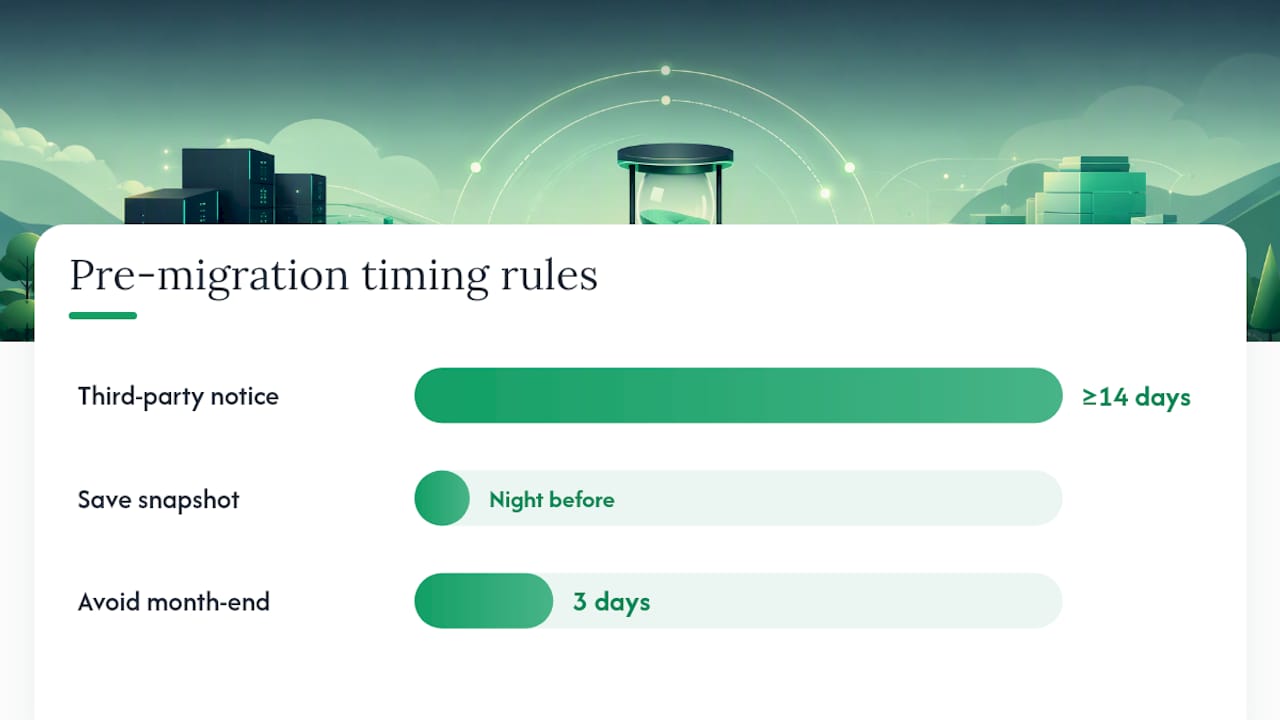
Forvis Mazars recommends saving copies of all schedules and financials the night before the scheduled migration — not the week before, the night before. That snapshot is your reconciliation anchor.
Notify third parties early. Marketing feed providers, parts vendors, and your floorplan lender all connect to your DMS in some way. Give them at least two weeks’ notice. Pick a go-live date that avoids month-end and falls on a low-volume day (Tuesday or Wednesday works well for most independent lots).
Pro Tip: Avoid scheduling your cutover during the last three business days of any month. Floorplan curtailments and bank reconciliations are already stressful — adding a system switch on top compounds both.
Which fields do you need to map before importing?
Field mapping is where migrations succeed or fail quietly. A mismatched GL account or a truncated address field will not throw an error — it will just produce wrong numbers for months.
Core vehicle fields to map:
- VIN (standardized 17-character format, no spaces)
- Stock number (your internal identifier)
- Acquisition cost, recon costs, transport costs (separate line items, not rolled up)
- Reconditioning completion date
- List price and sale price
Customer record fields:
- Full legal name, address, phone, email
- Date of birth (if used for ID verification)
- Vehicle ownership links (which customer bought which unit)
- Privacy consent flags (required for CAN-SPAM and state privacy compliance)
Sales and deal fields:
- Deal header (deal number, date, salesperson)
- Trade-in information and ACV
- Taxes, fees, and F&I product line items
- Payment schedule and bank/floorplan linkages
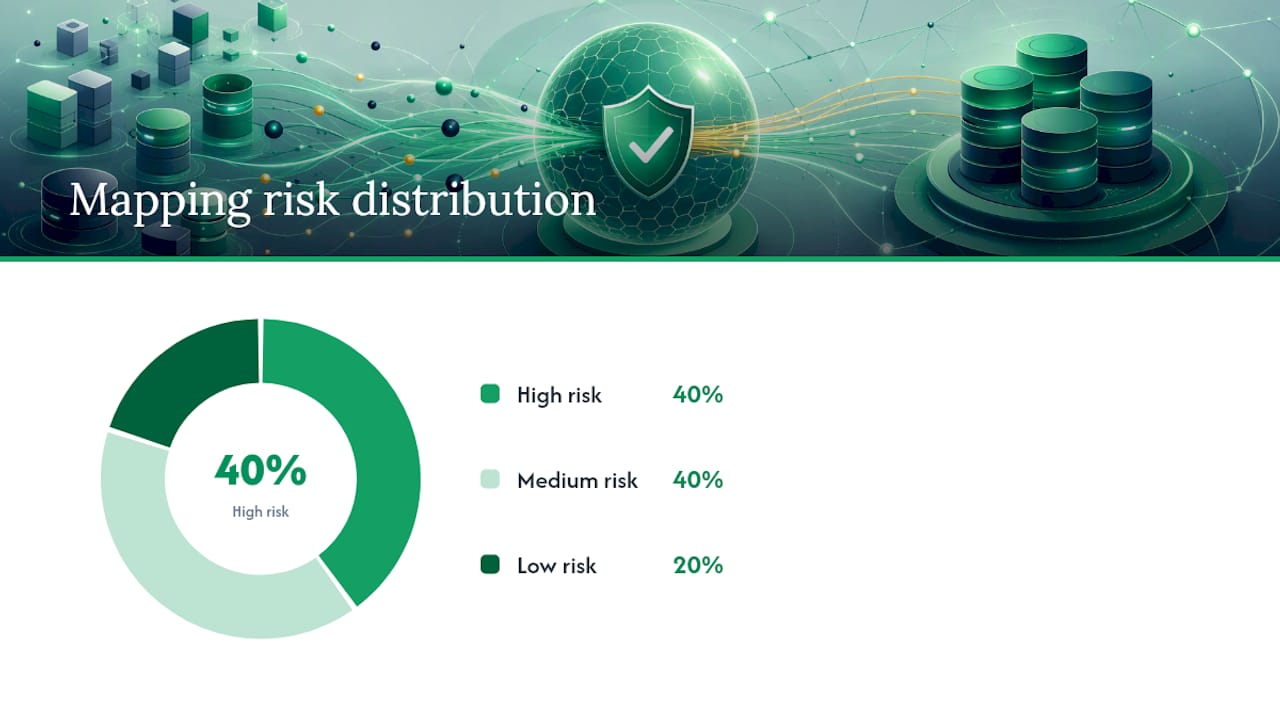
Accounting mappings deserve their own conversation. Your GL account mapping connects your old chart of accounts to Loturn’s automotive COA. Every account needs a destination: vehicle sales revenue, cost of goods sold, recon expense, floorplan interest, and so on.
| Field Group | Example Fields | Mapping Risk |
|---|---|---|
| Vehicle identifiers | VIN, stock #, year/make/model | Low (standardized) |
| Cost fields | Acquisition, recon, transport | High (often rolled up in legacy systems) |
| Customer records | Name, DOB, consent flags | Medium (truncation common) |
| GL accounts | Revenue, COGS, expense accounts | High (COA structure varies) |
| Deal transactions | Taxes, F&I items, trade ACV | Medium |
Pro Tip: Map acquisition cost, recon, and transport as three separate fields — not one combined “total cost” field. Loturn’s per-car profit calculations depend on that granularity. Collapsing them at import means rebuilding them manually later.
PartsEdge warns that missing demand history and parts receipts during migration cause obsolescence spikes and break automated ordering logic — verify these fields immediately after import.
What export formats does Loturn accept?
Most DMS platforms export in one of four formats: CSV flat files, XML, IIF (.iif), or direct API. Each has trade-offs.
- CSV: Easiest to produce and inspect. Requires rigorous formatting: consistent date formats (MM/DD/YYYY), no merged cells, UTF-8 encoding, and decimal separators that match your locale. Loturn ingests CSV natively.
- XML: Richer structure, better for nested records like deal line items. Requires endpoint setup but reduces manual field-matching errors. Loturn supports XML imports for certain data domains.
- IIF (.iif): Common for accounting exports from older systems. Stone Edge documents that IIF errors reference specific line numbers — when an import fails, the offending transaction is skipped and the rest proceed. The fix is to revert to your pre-import backup and correct that line manually.
- API: Cleanest transfer, fewest formatting errors, but requires your legacy DMS to expose an API endpoint. Available for select Loturn integration partners.
File-prep checklist before sending any file to Loturn:
- Normalize all VINs to 17 characters, uppercase, no spaces
- Confirm date format is consistent across every row
- Remove Excel formatting (colors, merged cells, formulas)
- Save as UTF-8, not Windows-1252
- Keep a timestamped backup of every export file before import
How does a phased migration project actually run?
Seven phases, each with a clear owner and acceptance gate. Skipping a phase to save time is how dealers end up with a trial balance with a significant variance on day one.
- Discovery (dealer finance + Loturn): Audit legacy data, identify gaps, confirm scope and go-live date.
- Mapping (finance lead + Loturn): Complete field-mapping spreadsheet and GL account mapping. Acceptance: every field has a destination.
- Extract (dealer IT): Export all data domains in agreed formats. Acceptance: file checksums verified, no empty required fields.
- Transform/Cleanse (dealer + Loturn): Standardize formats, deduplicate customers, split rolled-up cost fields. Acceptance: zero duplicate VINs, all costs itemized.
- Staging Import (Loturn): Load data into a test environment. Acceptance: record counts match source.
- Verification and UAT (finance lead + department champions): Run reconciliations, spot-check per-vehicle costs, confirm inventory dollar total. Acceptance: trial balance agrees within tolerance; inventory total matches exactly.
- Cutover and Go-Live (project champion + Loturn support): Switch live traffic to Loturn. Old DMS stays readable.
| Phase | Owner | Key Milestone |
|---|---|---|
| Discovery | Finance + Loturn | Scope document signed |
| Mapping | Finance lead | Field-mapping spreadsheet complete |
| Extract | Dealer IT | Export files verified |
| Transform | Dealer + Loturn | Clean files ready for staging |
| Staging Import | Loturn | Record counts match |
| Verification | Finance + champions | Trial balance reconciled |
| Go-Live | Project champion | Loturn live, old DMS on standby |
Ecosire notes that DMS data typically flows to accounting systems through nightly batch processes for end-of-day totals. Plan your journal imports to align with month-end and bank reconciliation windows — mid-month imports create partial-period mismatches that are tedious to unwind.
How do you verify financial integrity after import?
Reconciliation is not optional. Run these checks before you declare go-live successful.
- Opening trial balance: Export from old DMS, import into Loturn, compare account by account. Any variance needs a source.
- Inventory dollar total: The sum of all vehicle costs in Loturn must match your pre-migration inventory pad exactly.
- Per-vehicle cost spot checks: Pull 10 random units. Confirm acquisition, recon, and transport match your source records.
- Bank reconciliation: Loturn’s bank balance for the cutover date must match your bank statement.
- Floorplan reconciliation: Each unit’s floorplan balance in Loturn must match your lender’s statement.
- Open AR/AP: Compare open-item counts and totals to your pre-migration aging reports.
- Sales journal total: Loturn’s sales journal for any imported historical period must match your old DMS register.
Go/No-Go gate: If the trial balance variance exceeds your tolerance or the inventory dollar total does not match, do not go live. Correct in staging first.
Forvis Mazars recommends keeping the old DMS active for at least 30 days and ideally up to a year for audit and reference needs. Most dealers find a short period sufficient; dealerships with complex floorplan structures or open audits should consider a longer window.
What are the most common migration problems and how do you fix them?
Missing demand history and parts receipts. This is the one dealers miss most often. PartsEdge documents that gaps here cause obsolescence spikes and break automated ordering. Check months-no-receipt fields and receipt dates in your first post-import report run.
Mismatched GL mapping. A vehicle sale posted to the wrong revenue account will look fine in the deal screen and wrong in every financial report. Catch it during staging by running a post-import income statement and comparing it to your old DMS.
Truncated text fields. Long addresses and business names often get cut at character limits. Spot-check the longest customer names and addresses in your file.
Bad VIN formats. Non-standard VINs (15 characters, lowercase, spaces) break vehicle lookups. Run a VIN validation pass before export.
Duplicate customer records. Two records for the same buyer create split deal histories. Deduplicate before extract, not after import.
Dropped scanned documents and custom fields. Most DMS platforms do not export scanned PDFs cleanly. Keep the old system accessible and download critical documents manually before decommissioning.
Pro Tip: Hold your DMS vendor accountable in writing. Specify in your contract which datasets must transfer completely — inventory demand history and parts receipts especially. Verbal assurances do not survive a post-migration dispute.
When should you hire a migration specialist vs. use Loturn’s import service?
| Scenario | Recommended Approach |
|---|---|
| Single lot, straightforward COA, under 500 vehicles | Loturn self-service import + onboarding |
| Multiple integrations, custom GL structure, 500 vehicles | Loturn assisted import |
| Multi-rooftop, complex floorplan allocations, active audit | Third-party migration specialist |
The cost-versus-risk math is straightforward. A financial consultant specializing in dealership conversions costs money upfront. A post-migration reconciliation that takes three months to untangle costs more — in staff time, in delayed reporting, and in the risk of filing incorrect tax returns. Digital Dealer’s analysis confirms that dealers motivated primarily by cost savings often underestimate the organizational effort and benefit from a dedicated transition consultant.
Decision criteria: if you have a custom chart of accounts, multiple floorplan providers, or an open audit, bring in outside help. If you are a single-lot independent with a standard COA and fewer than 500 vehicles, Loturn’s onboarding team can handle the import with you.
What Loturn has learned from real dealer migrations
The most common surprise in a dealership data migration is not the data itself — it is the rolled-up cost fields. Dealers often discover mid-mapping that their old system stored acquisition, recon, and transport as a single “total cost” number. Loturn’s field-mapping templates are built to catch this early, prompting finance leads to source the itemized figures from purchase orders and recon invoices before the import runs.
Staged imports prevent the second most common problem: a finance team that approves a migration without seeing the data in context. Loturn loads data into a staging environment first, generates a reconciliation report, and only moves to live posting after the finance lead signs off. Bank-level encryption protects data throughout the transfer and at rest in Loturn’s system.
Loturn’s migration service: what you get and how to start
Loturn’s per-car profit tracking only works if the cost data underneath it is accurate from day one. That is why Loturn includes free data import assistance with every onboarding.
What the service covers: staged CSV and XML imports, GL account mapping support, field-mapping templates, and a post-import reconciliation checklist your finance lead can run in under an hour. Data is protected with bank-level encryption at every stage. The onboarding team will walk you through the accounting features — chart of accounts setup, journal import rules, and floorplan interest tracking — before your go-live date.
To start, reach out to Loturn’s onboarding team directly or Loturn. Most single-lot dealers complete the import and reconciliation within one to two weeks of starting onboarding.
Sources
- DMS Conversion Ahead? Your Dealership CPA Has a 10-Step Roadmap | Forvis Mazars US
- Automotive ERP Implementation: Dealer, OEM, and Aftermarket | ECOSIRE
- Export Accounting Data — Stone Edge
- Surviving a DMS Migration: Lessons from the Trenches
- 5 Keys to a Successful DMS Migration
This article is general information, not a substitute for advice from a qualified financial advisor. Consult a qualified financial professional about your own circumstances before acting on anything here.
FAQ
What data can you migrate from a DMS into Loturn?
Loturn accepts inventory records, per-vehicle costs (acquisition, recon, transport), customer records, sales and deal transactions, accounting journals, GL balances, and floorplan metadata. Scanned documents and highly custom fields may require manual handling.
How long does a DMS migration to Loturn take?
Most single-lot independent dealers complete the import and reconciliation within one to two weeks of starting onboarding. Multi-rooftop or complex accounting migrations typically run three to six weeks.
Do you need to keep your old DMS after migrating to Loturn?
Yes, for at least 30 days. Forvis Mazars recommends maintaining the old system for a short redundancy window — and up to a year for audit reference — because scanned documents and custom fields sometimes do not transfer completely.
What export format works best for migrating dealership data?
CSV is the most common and easiest to verify manually. XML handles nested deal records better. IIF files work for accounting exports but require careful error handling: if a line fails, revert to your pre-import backup and correct that specific transaction before re-importing.
Does Loturn charge for data import assistance?
Loturn includes free data import assistance during onboarding. The service covers staged imports, GL mapping support, and a post-import reconciliation checklist.