
A properly configured document management system (DMS) is the fastest, safest way for an auto dealership to cut administrative time, pass audits, and connect deal paperwork to per-car accounting. If your store arranges financing, the FTC Safeguards Rule already classifies you as a financial institution, which means a written information security program is not optional. A DMS operationalizes those controls. This week, run a 30-minute document map of your F&I desk. Then request a demo from Loturn to see how document capture ties directly to per-car profit tracking.
Key Takeaways
A DMS built for dealerships reduces audit response time, closes per-car accounting gaps, and operationalizes the Safeguards Rule controls your written information security program requires.
| Point | Details |
|---|---|
| FTC Safeguards Rule applies to most dealers | Dealers who arrange financing are financial institutions and must maintain a written information security program. |
| Prioritize integrations with per-car accounting | A DMS connected to your accounting system assigns costs to the correct VIN automatically, eliminating manual reconciliation. |
| Limit backlog scanning in the first 30–90 days | Scan only the last 12–24 months of deal jackets first; defer older archives to control cost and speed go-live. |
| Use a weighted scorecard for vendor selection | Weight security and integrations at 25% each; eliminate any vendor scoring below 3 on either criterion. |
| Loturn combines document capture and accounting | Loturn’s AI invoice management and per-car profit tracking work in one platform, reducing the number of systems dealers must manage. |
Table of Contents
- Why document management at dealerships pays off fast
- Core DMS features every dealership must require
- How a DMS supports the FTC Safeguards Rule for dealers
- Which integrations and process changes actually matter
- What does dealership DMS implementation actually cost?
- How to choose the right dealership DMS vendor
- How Loturn ties document capture to per-car accounting
- Handling third-party document exchanges and state DMV compliance
- What the DMS rollout actually taught me
- Loturn connects document capture and per-car profit in one place
- Sources
- FAQ
Why document management at dealerships pays off fast
Dealers who digitize their records report the same two wins first: documents that used to take minutes to locate now surface in seconds, and audit responses that once required a day of digging get handled in under an hour. WardsAuto documents document that document management tools centralize dealer records, speed retrieval, and transform cross-department workflows, with ROI showing up most clearly in time savings and audit readiness.
The downstream effects on accounting are just as real. When every repair order, buyer’s order, and title document is indexed to a VIN or deal number at the point of capture, your per-car cost picture becomes accurate without manual reconciliation. Missing deal jackets slow F&I closings, create compliance exposure, and make it nearly impossible to know your true gross on a vehicle. Digitizing those records removes all three problems at once.
Key operational benefits dealers see after going digital:
- Retrieval time drops from minutes to seconds for any document indexed by VIN, RO#, or deal number
- Deal jackets stay complete, reducing F&I delays caused by missing signatures or forms
- Audit response time shrinks because exportable logs and organized folders replace manual searches
- Accounting accuracy improves when invoices and fees are assigned to the correct vehicle at capture
- Storage costs fall as physical filing space is reclaimed or eliminated
- Customer experience improves when staff can answer questions without putting callers on hold to find paper files
DocuWare’s dealership use-case documentation highlights workflow automation and audit-readiness as the core reasons dealers move off paper, noting that centralizing sales and service documents reduces handling time and speeds approvals across departments.
Core DMS features every dealership must require
The industry term for what dealers are buying is a document management system, sometimes called an electronic document management system (EDMS). The phrase “dealership document management” is how most dealers search for it, but the underlying technology is the same. Here is what the feature set needs to include.
Capture and indexing
Every document that enters your store needs a capture path: a desktop scanner, a mobile app, or email-to-archive. OCR (optical character recognition) converts scanned images into searchable text. What matters more than OCR quality is the indexing schema. Dealers should require automatic foldering tied to VIN, RO#, deal number, and customer name. Scan123 describes same-day deployments with searchable archives indexed exactly this way, which illustrates what a dealer-specific vendor should deliver on day one.
Search, retrieval, and version control
A DMS without fast, field-level search is just a digital filing cabinet. You need to pull a deal jacket by VIN in under five seconds. Version control matters for contracts and addenda: the system should timestamp every revision and preserve prior versions so you can prove what a customer signed and when.
Workflow automation and e-signatures
Task queues and approval routing cut the back-and-forth between F&I, service, and accounting. E-signature support, with proper disclosure practices, eliminates the physical signing bottleneck. For guidance on e-sign disclosures and verification, BeeSign’s electronic signature disclosure resource covers the legal considerations dealers should confirm with their vendor.
Security, retention, and access controls
Role-based access, encryption at rest and in transit, and a full audit log are non-negotiable. Retention policies should be configurable by document type so that titles, buyer’s orders, and service records each follow their required retention window automatically.
Integration depth
A DMS that cannot talk to your dealer management system or accounting platform creates a second data silo. API connectors or native integrations with your per-car accounting system are what turn document capture into financial intelligence.
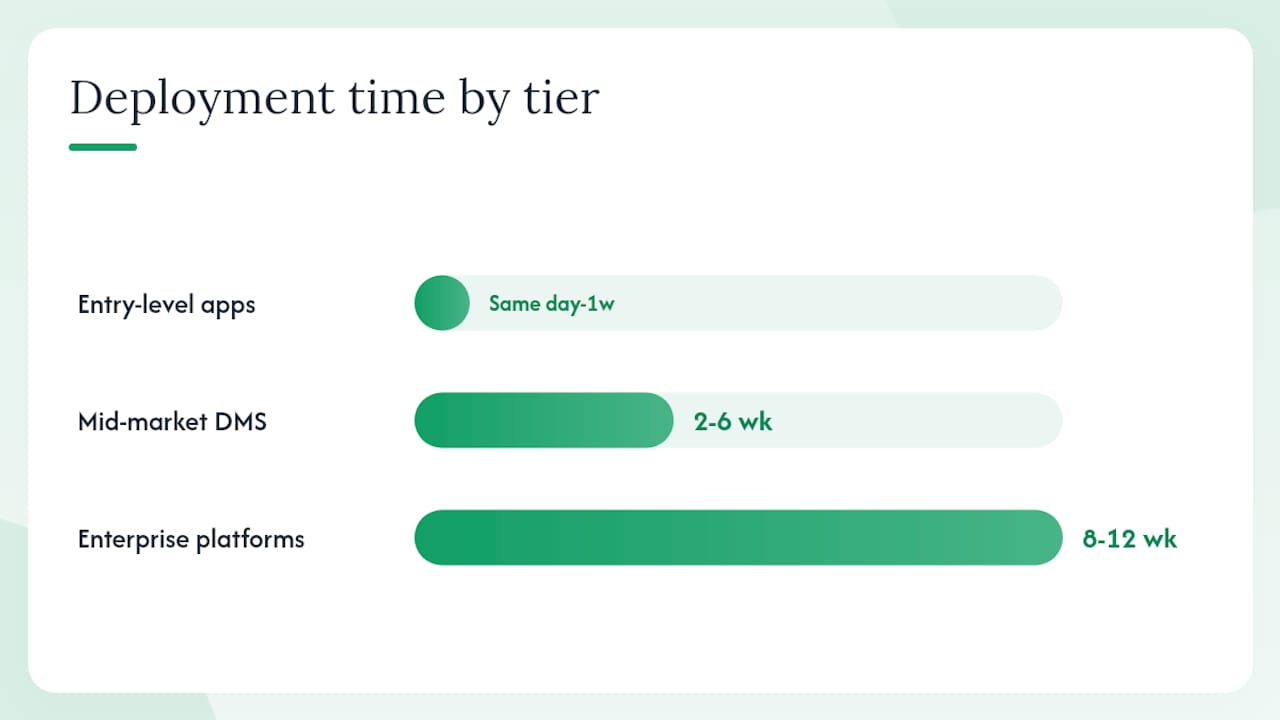
| Feature category | Entry-level field apps | Mid-market DMS | Enterprise platforms |
|---|---|---|---|
| Deployment time | Same day to 1 week | 2–6 weeks | 8–12 weeks |
| Security features | Basic password protection, limited logging | Role-based access, encryption, audit logs | Full SOC 2, advanced access controls, SIEM integration |
| Integration depth | Manual export/import | API connectors to common DMS/accounting | Deep ERP, multi-location, custom API |
How a DMS supports the FTC Safeguards Rule for dealers
A DMS is not a compliance solution by itself. It is the operational control layer that makes your written information security program repeatable and auditable. The FTC’s Safeguards Rule FAQ for automobile dealers is direct: dealers who arrange or facilitate financing are financial institutions under the Gramm-Leach-Bliley Act and must maintain a written information security program scaled to their volume and the sensitivity of customer data. A breach notification requirement to the FTC took effect in May 2024.
Here is how specific DMS capabilities map to Safeguards Rule elements:
- User access controls: role-based permissions limit who can view, edit, or export customer financial records
- Encryption: data encrypted at rest and in transit protects customer information from interception or unauthorized access
- Audit logs: timestamped, exportable logs document every access and change, giving auditors repeatable evidence
- Secure sharing: encrypted links or permissioned portals replace emailing sensitive documents as attachments
- Retention and disposition: configurable policies ensure records are kept for required periods and then destroyed on schedule
- Breach notification readiness: audit logs and access records make it faster to identify the scope of a breach and meet the 30-day notification window for certain events
Compliance checklist for vendor demos:
- Request a live demonstration of role-based access controls and show how permissions are assigned by job function
- Ask the vendor to export a sample audit log and confirm it is tamper-evident
- Confirm encryption standards (AES-256 at rest, TLS 1.2 or higher in transit)
- Verify configurable retention policies by document type
- Ask how the system handles disposition (deletion or destruction) at end of retention
- Confirm the vendor’s own SOC 2 Type II report or equivalent security certification
Pro Tip: Document your DMS controls in a one-page addendum to your written information security program. List the specific settings (access tiers, encryption standard, log export schedule) and review them annually. Auditors want repeatable evidence, not a one-time migration screenshot.
State-level requirements add another layer. Pennsylvania’s authorized agent guidance, for example, specifies minimum image quality, required indexing fields (VIN, plate, name), and retention windows, with some documents requiring a short paper-retention period before scanning is permitted. Check your state’s DMV or dealer association guidance before finalizing your scanning workflow. Loturn’s state-by-state dealer forms resource is a useful starting point for identifying which documents your state requires.
Which integrations and process changes actually matter
Prioritize integration with your per-car accounting system first, then your dealer management system connector, then CRM and service schedulers. Everything else is secondary.
The reason is straightforward: a document captured but never linked to a vehicle record forces manual reconciliation later. When capture, indexing, and accounting are connected, the workflow looks like this:
End-to-end deal jacket flow: A buyer’s order is scanned at the F&I desk and indexed to VIN 1HGBH41JXMN109186 and deal #4412. The DMS automatically places it in the deal jacket folder. An automated rule pushes the associated transport invoice and recon receipt to the same folder. The per-car accounting system pulls those costs against the VIN, and the gross profit figure updates without anyone touching a spreadsheet.
That flow only works if your DMS has a live connector to your accounting platform. For independent dealers, dealer-specific accounting differs substantially from generic tools, and a DMS that integrates with a platform built around per-car costing delivers far more value than one connected to a general ledger.
Common integrations to confirm during vendor selection:
- Dealer management system (DMS-to-DMS) connector for deal and inventory data
- Per-car accounting export or API for cost assignment
- E-signature platform for buyer’s orders, disclosures, and service authorizations
- Bank and payment processor feeds for floorplan and payoff documentation
- State DMV or authorized agent portals for title and registration document exchange
- Scan hardware drivers (network scanners, mobile capture apps)
Synchronous integrations update records in real time; asynchronous ones batch-sync on a schedule. For deal jackets, real-time sync is worth paying for. For monthly accounting exports, batch is usually fine.
What does dealership DMS implementation actually cost?
The quick answer: cloud-based setups for a single-location dealer can be live in days; multi-location migrations with backlog scanning typically run 8–12 weeks. Pricing follows flat monthly tiers or per-dealership subscriptions, with optional fees for backlog scanning and data migration.
Budget ranges by implementation type:
- Entry-level: A single-location dealer using a cloud-hosted, dealer-specific scanning tool with minimal backlog. Low monthly subscription, minimal setup cost, often same-day or next-day deployment.
- Mid-market: A dealer adding workflow automation, e-signature, and accounting integration. Moderate monthly fee plus a one-time migration or setup fee. Backlog scanning adds cost depending on volume.
- Full-service: Multi-location or high-volume dealer requiring custom integrations, enterprise security, and full backlog scanning. Higher monthly commitment plus professional services for migration and training.
Macrosmith positions its dealership DMS with unlimited scanning and fixed monthly pricing, which illustrates the flat-tier model many dealer-focused vendors use to make budgeting predictable.
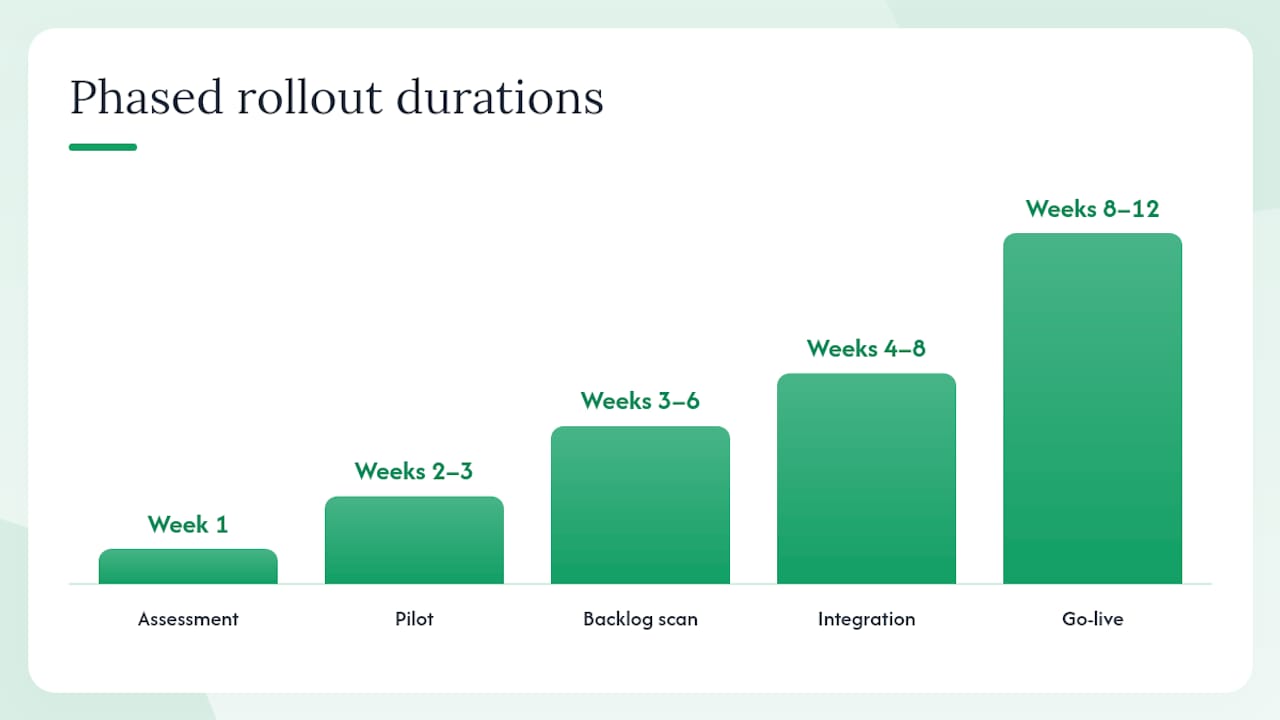
Phased rollout timeline:
- Assessment (Week 1): Map current document types, volumes, and storage locations; identify compliance gaps
- Pilot (Weeks 2–3): Deploy for one department (F&I or service) with live documents only
- Backlog scan (Weeks 3–6): Scan mission-critical historical records (last 12–24 months of deal jackets); defer older archives
- Integration (Weeks 4–8): Connect DMS to accounting and dealer management systems; test automated indexing
- Training (Week 7–8): Focused sessions by role; designate power users as internal champions
- Go-live (Week 8–12): Full department rollout; paper intake stops
- Post-live support (Weeks 12+): Monitor indexing accuracy, audit log reviews, and user adoption metrics
Pro Tip: Limit backlog scanning to the last 12–24 months of deal jackets and open repair orders in your first 30–90 days. Scanning everything at once inflates cost and delays go-live. Older archives can be scanned in a second phase once the team is comfortable with the new workflow.
For disaster recovery: confirm your vendor maintains geographically redundant backups with a defined recovery time objective (RTO). Ask specifically whether backups are tested on a regular schedule and whether you can export your entire archive in an open format if you ever switch vendors.
How to choose the right dealership DMS vendor
Use a short demo script and a weighted scorecard. Ask every finalist to demonstrate the same five scenarios: retrieve a deal jacket by VIN, export an audit log, show role-based access settings, demonstrate an automated retention policy, and walk through the integration with your accounting system.
Questions to ask during vendor demos:
- What API access do you provide, and is it documented for third-party integrations?
- What encryption standard do you use at rest and in transit?
- How are backups performed, and can I export my full archive in an open format?
- What is your retention policy configuration, and how does disposition work at end of retention?
- Do your audit logs meet the requirements for FTC Safeguards Rule documentation?
- Are you SOC 2 Type II certified, or do you have an equivalent security audit report?
- How do you handle state DMV scanning requirements and authorized agent compliance?
Red flags to watch for:
- No exportable audit log or logs that cannot be filtered by user and date
- Proprietary file formats with no open export path (vendor lock-in)
- Vague answers about encryption standards or no documentation available
- No role-based access controls, only a single admin login
- Retention policies that are fixed rather than configurable by document type
- No reference to the FTC Safeguards Rule or dealer compliance in their materials
Scoring template (weight these criteria in your evaluation):
- Security and compliance controls (25%)
- Integration depth with your accounting and DMS systems (25%)
- Search quality and retrieval speed (20%)
- Deployment speed and migration support (15%)
- Total cost of ownership over 36 months (15%)
Score each vendor 1–5 on each criterion, multiply by the weight, and sum. Any vendor scoring below 3 on security or integrations should be eliminated regardless of total score.
How Loturn ties document capture to per-car accounting
Loturn integrates AI invoice and document management directly with per-car accounting, making every deal document traceable to vehicle profitability. That combination is what most standalone document tools miss: they capture and store, but they do not connect the paper trail to your gross.
Here is how Loturn’s features address the most common dealer pain points:
- Bank-level encryption protects customer financial data at rest and in transit, supporting your Safeguards Rule written information security program
- AI invoice and document management captures and categorizes invoices automatically, reducing manual data entry for recon, transport, and F&I costs
- Per-car profit tracking assigns every captured cost to the correct VIN, so your gross is accurate before the car sells, not after the month closes
- Native double-entry accounting with an automotive chart of accounts eliminates the gap between your DMS and a generic bookkeeping tool
- Free data import and onboarding assistance means your existing deal history moves over without a manual re-entry project
- Integrated CRM keeps customer follow-up and deal documentation in the same system, reducing the number of platforms your staff must switch between
Dealers who have piloted Loturn’s document capture alongside per-car accounting report faster audit responses and a clearer picture of true gross per vehicle.
Pro Tip: When you start your Loturn pilot, begin with your F&I desk and capture the last 30 days of deal jackets. That single department generates the highest document volume and the most compliance exposure, so early wins there build team confidence quickly.
For dealers evaluating how per-car profit tracking fits into a broader accounting workflow, Loturn’s inventory management buyer’s guide walks through how vehicle records, costs, and documents connect across the platform.
Handling third-party document exchanges and state DMV compliance
Every dealership exchanges documents with parties outside its walls: state DMV offices, lenders, auction houses, warranty administrators, and insurance providers. Each of those exchanges carries its own format requirements, retention rules, and, in some cases, authorized agent obligations.
State DMV requirements are the most variable. Some states accept scanned title documents with specific image quality minimums and indexing fields; others require wet signatures on certain forms for a defined period before a scanned copy is legally sufficient. Pennsylvania’s authorized agent guidance, for example, specifies VIN, plate number, and customer name as required index fields, and sets minimum image resolution standards. Before you finalize your scanning workflow, pull your state’s dealer association guidance or DMV authorized agent rules. Loturn’s dealer forms by state resource lists official state links so you can verify current requirements without hunting through agency websites.
For lender and finance company exchanges, most major lenders now accept electronically signed documents with proper e-sign disclosures. Confirm that your DMS or e-signature tool generates a compliant audit trail for each signed document, including the signer’s identity verification method and timestamp. Document verification practices for financial services cover the verification standards that lenders and regulators increasingly expect.
Auction and wholesale transactions generate their own paper trail: condition reports, arbitration forms, and title reassignments. Index these to the VIN at the point of receipt so they are available if a title dispute or warranty claim surfaces months later. A clean paper trail has resolved more than a few post-sale disputes that might otherwise have become legal problems.
What the change management piece actually looks like
Most DMS rollouts fail not because the software is wrong but because staff revert to paper when the new process feels slower than the old one. The fix is not more training. It is a simpler indexing SOP and a power user on each shift who can answer questions without escalating to management.
Pick two or three employees who are already comfortable with technology and make them internal champions before go-live. Give them early access during the pilot, let them find the friction points, and have them help write the one-page SOP that everyone else follows. When a colleague gets stuck on day three of go-live, they call the champion, not the vendor helpline.
Early wins matter. If staff can retrieve a deal jacket in five seconds on day one, they stop missing paper. That single experience converts skeptics faster than any training session.
Mobile and remote access for dealership staff
Service advisors writing repair orders from the lot, managers approving deals from home, and F&I staff pulling documents for a lender call at 7 PM all need mobile access. Confirm that your DMS has a native mobile app or a responsive web interface with the same role-based permissions as the desktop version. Remote access without proper access controls creates exactly the exposure the Safeguards Rule is designed to prevent, so mobile capability and security must be evaluated together, not separately.
What the DMS rollout actually taught me
An editorial perspective on change management and user adoption
The piece of DMS implementation that most guides underestimate is the indexing discipline problem. You can deploy the best software in the market, and within two weeks, staff will be scanning documents without filling in the VIN field because it takes an extra ten seconds. That gap compounds fast: six months later, you have a searchable archive full of documents that cannot be found by the identifier that matters.
The fix is not a stricter policy. It is a mandatory-field configuration at the point of capture. If the system does not accept a scan without a VIN or deal number, the problem disappears. Ask every vendor you demo whether required fields can be enforced at capture, not just recommended.
The second thing most rollout guides miss is the emotional dimension of going paperless. Long-tenured staff often feel that paper is more reliable because they can see it. The way to address that is not to argue with them. It is to show them, within the first week, a moment where the digital system saved them time they would have lost with paper. One retrieval win, in front of the skeptic, does more than a month of training sessions.
Compliance framing also helps. When staff understand that the Safeguards Rule requires documented controls and that the DMS is how the dealership demonstrates those controls to regulators, the indexing discipline conversation shifts from “extra work” to “protecting the store.” That reframe is worth having early.
Loturn connects document capture and per-car profit in one place
Independent dealers managing financed deals need document capture and per-car accounting to work together, not as two separate subscriptions. Loturn handles both: AI-assisted document capture assigns invoices and deal paperwork to the correct vehicle automatically, while native double-entry accounting gives you a real gross figure before the car leaves the lot.
A practical starting point is a 30-day pilot on your F&I desk. Scan one month of deal jackets, let Loturn’s AI categorize and assign the costs, and compare your per-car gross figures against what your current process shows. The gap is usually the number that convinces a skeptical manager. Loturn includes free data import and onboarding support, so the setup does not require a dedicated IT project. Explore Loturn’s accounting features or Loturn to see how document capture and per-car profit tracking work together in a single platform.
Sources
- Automobile Dealers and the FTC’s Safeguards Rule - Frequently Asked Questions
- How Document Management Tools Transform Dealerships
- Document management system for auto dealerships | DocuWare
- The Document Management System Built for Dealerships
FAQ
What is a DMS in a dealership context?
In a dealership, DMS stands for document management system, a platform that captures, indexes, stores, and retrieves deal jackets, repair orders, titles, and compliance records tied to VIN, deal number, or customer name.
Do independent dealers need a dedicated document management system?
Any dealer who arranges financing is classified as a financial institution under the FTC Safeguards Rule and must maintain documented security controls. A dedicated system makes those controls repeatable and auditable in a way that paper filing cannot.
What is the best document management approach for independent dealers?
The strongest approach pairs document capture with per-car accounting so that every invoice and deal document is assigned to the correct vehicle automatically. Loturn combines AI document management with native per-car profit tracking in a single platform built for independent used-vehicle dealers.
How much does dealership document management software cost?
Pricing varies by implementation type. Entry-level cloud tools for a single location typically follow a low flat monthly subscription; mid-market solutions with workflow automation and accounting integration carry a moderate monthly fee plus optional migration costs; full-service enterprise deployments add professional services. Request fixed monthly pricing and confirm whether backlog scanning is included or billed separately.
How long does it take to deploy a dealership DMS?
Simple cloud setups for a single location can be live in one day to one week. Multi-location migrations with backlog scanning and accounting integrations typically run 8–12 weeks across assessment, pilot, integration, training, and go-live phases.