
Yes — dealers can e-sign most car-sale documents in the U.S. Three things to check before you go fully digital:
- State DMV and title rules. Some states still require wet-ink signatures or in-person notarization on title transfer forms. Confirm your state’s position before you change any paper process.
- Lender acceptance. Captive finance companies and major banks generally accept e-signed Retail Installment Sale Contracts (RISCs), but smaller lenders vary. Get written confirmation from every lender you fund through.
- Identity verification and audit trail. An e-signature is only as defensible as the authentication behind it. Every signed packet needs a complete, tamper-evident audit trail: timestamps, IP address, signer identity metadata, and document hash.
This week: pull your top two lenders’ e-sign policies in writing, check your state DMV’s title guidance, and identify one branch for a 20-deal pilot.
Table of Contents
- Is e-signing car deals legal under federal law?
- Which documents in a car deal can actually be e-signed?
- What state DMV and title rules do you need to verify?
- How should you verify signer identity for vehicle transactions?
- How do lenders treat e-signed finance documents?
- How do you choose the right e-sign solution for your dealership?
- What does a complete dealer e-sign workflow look like?
- Recommended template fields, authentication presets, and retention settings
- Key Takeaways
- The part most dealers get wrong about going digital
- Loturn keeps your deal records and profit tracking in one place
- Useful sources for dealers
- FAQ
Is e-signing car deals legal under federal law?
The short answer is yes, and the statutory foundation is solid. The ESIGN Act (15 U.S.C. § 7001) and the Uniform Electronic Transactions Act (UETA) give electronic signatures the same legal effect as handwritten ones for most commercial contracts, provided three conditions are met: the parties have consented to transact electronically, records can be retained and reproduced accurately, and the signature can be reliably attributed to the signer.
Consent is not assumed. Under ESIGN, a consumer must affirmatively agree to receive records electronically, and that agreement must be captured before the signing session begins. In practice, this means a consent checkbox at the start of the signing workflow, confirmed by email or SMS verification, followed by a complete audit trail. That combination is what courts and regulators look for when a signature is challenged.
“An electronic signature or record shall not be denied legal effect, validity, or enforceability solely because it is in electronic form.” — ESIGN Act, 15 U.S.C. § 7001(a)
The statute has firm limits. Wills, certain court orders, notices of default or repossession, and some insurance cancellation notices are excluded from ESIGN’s coverage. For auto dealers, the practical exclusions are narrower: the main friction points are state-level title and notarization rules, not the federal statute itself. UETA, which 49 states have adopted in some form, mirrors ESIGN but allows states to carve out specific document categories, which is exactly where dealers run into variation.
Which documents in a car deal can actually be e-signed?
Most of a standard deal packet is e-signable. The exceptions cluster around title, notarization, and some state-specific odometer forms.
Typically e-signable (ESIGN/UETA compliant on most platforms):
- Purchase agreement / buyer’s order
- E-sign bill of sale (when executed on a compliant platform with full audit trail)
- Buyer’s Guide (FTC Used Car Rule disclosure)
- Privacy notice (Gramm-Leach-Bliley)
- Credit application and consent to pull credit
- F&I product disclosures (GAP, VSC, credit life)
- Arbitration agreement
- Trade-in disclosure
- Odometer disclosure (federal form) — check state supplement requirements
State-dependent — verify before e-signing:
- State title application (many states still require wet-ink or DMV-portal submission)
- State odometer disclosure supplement (some states require a separate paper form)
- Lien release documents (lender-specific requirements apply)
- Power-of-attorney for title transfer
Usually wet-ink or notarized:
- Certificate of title (the physical title document itself)
- Notarized lien releases in states requiring notarization
- Certain out-of-state title applications
- Affidavits required by specific DMVs
Industry experience confirms that most deal documents can be e-signed, but title and odometer exceptions still require state-level verification. A typical retail deal involves multiple signature-needed documents; the majority are e-signable, but some that are not can stall funding if you miss them.
Pro Tip: For remote or out-of-state purchases, e-sign the bill of sale on a compliant platform and handle the title separately: mail the wet-ink title to the buyer or use a Remote Online Notarization (RON) provider if your state and the buyer’s state both permit it. Keep the RON certificate in the digital deal jacket.
What state DMV and title rules do you need to verify?
Title rules are where e-sign rollouts most often stall. The federal ESIGN Act does not override state motor vehicle statutes, and many state DMVs still require a physical title document with a wet-ink signature for transfer. Many DMVs accept printed copies of digitally signed bills of sale, but notarization requirements remain state-specific and may require in-person or approved RON notarization.
Before you change any title-related paper process, run through this verification checklist for every state you sell into:
- Electronic title acceptance — Does the state DMV accept an electronic title application, or does it require the physical title with a wet-ink signature?
For state-specific form requirements, Loturn’s dealer forms by state index links directly to official DMV sources for every state, which is a faster starting point than searching each DMV site individually. States like California, Texas, and Michigan each have distinct title and odometer requirements worth reviewing before you pilot e-sign.
When you contact a state DMV for guidance, get the response in writing, whether that is an email reply or a downloadable guidance PDF. Save it in a dedicated compliance folder. If a DMV’s position is ambiguous, escalate to your state dealer association or outside counsel before assuming e-sign is acceptable for that form.
How should you verify signer identity for vehicle transactions?
Authentication strength should match transaction risk. A service authorization for a $300 repair does not need the same verification as a financed deal on a $35,000 truck. Here is a practical three-tier framework:
Low (service approvals, minor disclosures):
- Email link only
- Suitable for low-value, low-risk documents where the signer is already known
Standard (retail purchase agreements, cash deals, F&I disclosures):
- Email plus SMS one-time passcode (OTP)
- This is the recommended default for most retail deals
- Captures two independent contact points and creates a stronger attribution record
High (financed deals, out-of-state buyers, high-value transactions, remote signings):
- ID check (photo of government-issued ID matched against a selfie or document scan)
- Knowledge-Based Authentication (KBA) — questions drawn from credit bureau data
- RON for any document requiring notarization
- Biometric verification where the platform supports it
Verification methods available on major platforms include:
- Email verification — baseline, always on
- SMS passcode — adds a second factor tied to the buyer’s phone
- ID check — photo ID plus liveness check; DocuSign, Adobe Acrobat Sign, and signNow all offer this as an add-on
- KBA — draws on credit bureau records; useful for financed deals where the buyer’s identity is already being verified for credit
- RON — a notary verifies identity live via video; required for notarized documents in RON-accepting states
Pro Tip: Document the verification method used in the deal record itself, not just in the platform’s audit log. Add a field to your deal jacket template that records which authentication tier was applied and why. If a deal is ever disputed, you want that information in the file, not buried in a vendor dashboard.
How do lenders treat e-signed finance documents?
Most captive finance companies and major banks now accept e-signed RISCs and lease packets, but “most” is not “all,” and the ones that do not will kick back your funding packet without warning. E-signing improves efficiency, compliance documentation, and customer experience, and can accelerate funding when lenders accept e-signed packets, but lender acceptance is the variable you control least.
Before you go live, get written answers to these questions from every lender you fund through:
- Do you accept e-signed RISCs and lease packets?
- Do you require wet-ink notarization on any finance document?
- Do you require submission through your own lender portal, or will you accept a PDF packet?
- Are there specific format requirements for Reg Z / Truth-in-Lending disclosures (font size, field placement)?
- What metadata or audit-trail documentation do you require alongside the signed packet?
Ask for a sample accepted packet or an integration checklist. Some lenders have published e-sign acceptance guides; others will provide one on request. File the written confirmation in your compliance folder alongside your DMV state guidance.
When a lender will not accept e-signatures:
- Maintain a wet-ink fallback procedure for that lender’s deals, documented in your F&I desk process
- Note the lender exception in the deal jacket so the F&I manager knows before the signing appointment
- Set an escrowed funding timeline that accounts for the extra day needed to print, sign, and courier the packet
The upside of going digital is real. Dealers who implement e-sign with DMS integration and complete audit trails typically see fewer funding kickbacks for missing fields, because the platform enforces required fields before the packet is sent. That alone often justifies the transition for high-volume stores.
How do you choose the right e-sign solution for your dealership?
Feature priority should drive the decision, not brand recognition. Here is what actually matters for a dealership running 30–200 deals a month:
Must-have features:
- DMS integration (auto-populate deal data into templates; avoid re-keying)
- Multi-signer support with configurable signing order (buyer, co-buyer, F&I manager, lender)
- Bulk send and template library (one-click deal packet send)
- Layered authentication (email, SMS, ID check, KBA, RON)
- Tamper-evident audit trails with PDF/A finalization
- Automated delivery of signed copies to buyer and lender
- Searchable, encrypted archive
- Flat-rate pricing for high-volume months (per-envelope fees scale poorly at peak)
- Mobile signing experience for in-store tablet use and remote buyers
Vendor examples (not ranked, each noted for one commonly cited strength):
- DocuSign — broadest DMS and lender portal integrations; bill-of-sale templates available for customization
- Adobe Acrobat Sign — strong PDF workflow and Reg Z formatting compliance; widely accepted by lenders familiar with Adobe’s audit trail format
- signNow — competitive flat-rate pricing; purpose-built bill-of-sale e-signing with ESIGN/UETA compliance documentation
- PandaDoc — template library and CRM integrations; well-suited for dealers who want document generation alongside e-signing
- Dropbox Sign — clean API for custom DMS integrations; useful for dealers whose DMS vendor has a pre-built Dropbox Sign connector
Industry data shows that flat-rate pricing with unlimited signatures is the most dealer-friendly commercial model for high-volume stores, because per-envelope fees compound quickly during peak months.
Implementation pilot checklist:
- Select one or two test branches with cooperative F&I managers
- Run 20–50 real deals under supervision before full rollout
- Send three signed test packets to each lender partner and confirm acceptance before going live
- Get written lender confirmations during the pilot, not after
- Measure funding time and error/kickback rates before and after
- Document every exception (lender refusal, DMV wet-ink requirement) and build fallback procedures into your desk process
What does a complete dealer e-sign workflow look like?
A clean workflow from sale to archive runs in eight steps. Timing targets are included because vague “do this eventually” processes are how deals get stuck.
- Handle title transfer and archive — (Title clerk). Process the title per state DMV requirements. For states requiring wet-ink title, mail the signed title to the buyer or DMV. Archive the complete deal jacket, including the audit trail certificate and any RON certificate, in the funded deals archive. Retain for a minimum of seven years.
Fallback guard rails: if a buyer cannot complete remote signing within 24 hours, revert to in-store wet-ink for that deal rather than leaving the packet open. Any title-related document that cannot be e-signed in the buyer’s state gets flagged at step 1, not discovered at step 7.
Recommended template fields, authentication presets, and retention settings
A template that is missing fields is worse than no template, because it creates a false sense of completeness. Every retail deal packet template should include:
Required template fields: buyer legal name, co-buyer name (if applicable), VIN, year/make/model, odometer reading, sale price, fees itemized, tax amount, trade-in payoff (if applicable), lender name and account number, F&I product disclosures with pricing, signing order configuration, identity verification method used, and an audit trail footer on every page.
Authentication preset table:
| Preset | Transaction type | Methods | When to apply |
|---|---|---|---|
| Standard retail | Cash deal, known buyer, in-store | Email + SMS OTP | Default for most retail deals |
| Financed retail | RISC, lease, first-time buyer | Email + SMS + ID check or KBA | Any deal with lender funding |
| Out-of-state remote | Remote buyer, out-of-state title | Email + SMS + ID check + RON (if notarization required) | Remote or out-of-state transactions |
Retention and backup settings:
- Encryption at rest: AES-256 minimum
- Immutable archival copy: write-once storage or vendor-managed immutable archive
- PDF/A export: triggered automatically on finalization
- Separate archive folders: funded deals vs. cancelled deals vs. pending
- Retention period: seven years minimum; check state statute for longer requirements
Practical admin panel settings to configure on day one:
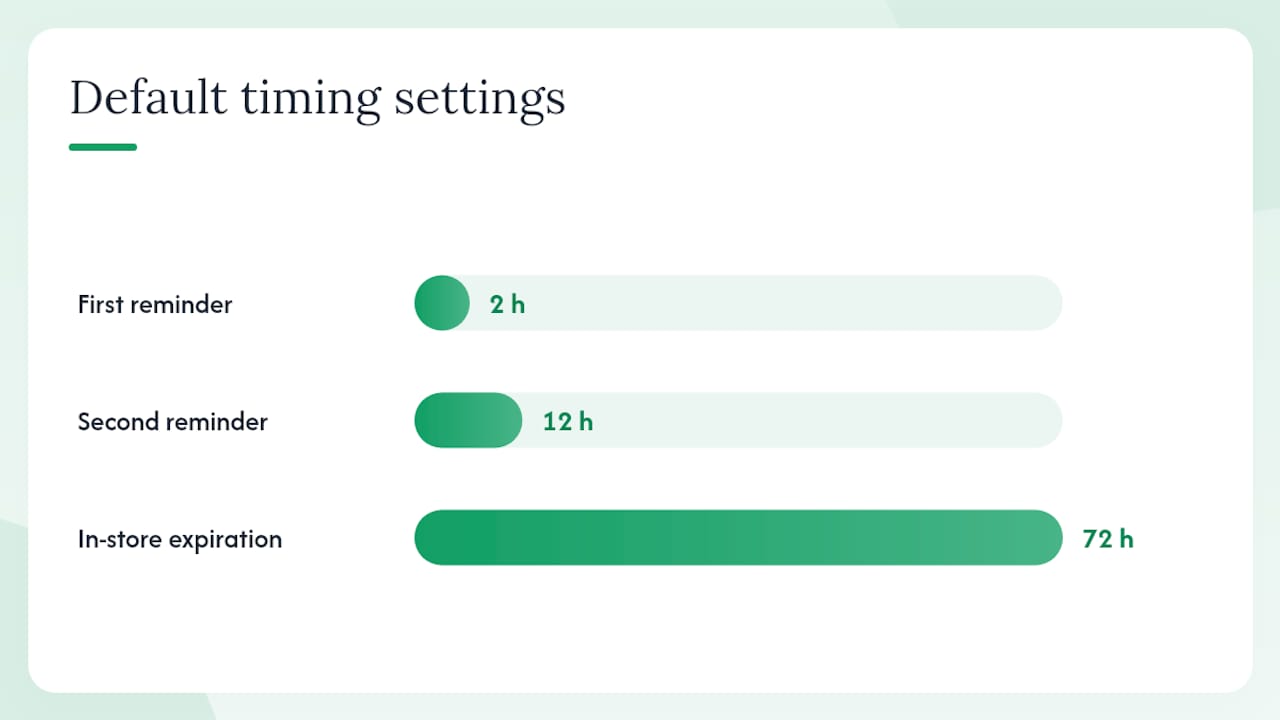
- Reminder frequency: 2 hours and 12 hours after send for unsigned packets
- Signing order: enforce sequential (buyer before F&I countersignature)
- Expiration: set packet expiration at 72 hours for in-store deals, 7 days for remote
- Audit trail: enable full event logging including “viewed” events, not just “signed”
Pro Tip: Export a PDF/A copy of every signed packet immediately on finalization and store it in your DMS or deal management system, independent of the e-sign vendor’s cloud. Vendor contracts change; your deal records should not depend on continued access to a third-party platform.
Key Takeaways
Dealers can legally e-sign most vehicle-sale documents under ESIGN and UETA, but state title rules, lender acceptance, and audit-trail completeness determine whether those signatures hold up when it counts.
| Point | Details |
|---|---|
| Federal law supports e-signing | ESIGN (15 U.S.C. § 7001) and UETA give e-signatures the same legal effect as wet ink when consent and retention requirements are met. |
| Title and notarization are state-specific | Many states still require wet-ink or notarized signatures on title transfer forms; verify your state’s DMV rules before changing any paper process. |
| Lender confirmation is non-negotiable | Get written acceptance from every lender you fund through before sending e-signed RISCs or lease packets. |
| Audit trail completeness protects you | Every signed packet needs timestamps, IP address, signer identity metadata, and a document hash to be defensible for lenders and courts. |
| Loturn organizes the deal-side workflow | Loturn’s deal paperwork automation and state-specific forms library complement your e-sign platform by keeping per-car costs, documents, and deal records in one place. |
The part most dealers get wrong about going digital
The dealers who struggle with e-sign rollouts are not the ones who picked the wrong vendor. They are the ones who treated it as a technology project instead of a compliance project. They configured templates, got the tablet set up in F&I, and then discovered three months later that their primary lender had been manually processing their e-signed packets as exceptions because nobody had gotten written confirmation upfront. One dealer I know of ran 60 deals before a lender audit flagged that their audit trail was missing the “document viewed” event, which their platform captured but had not been enabled in the admin settings. Sixty deals, all technically signed, all potentially challengeable.
The second thing dealers underestimate is state variance. It is easy to read “ESIGN applies nationally” and assume you are covered. You are covered for the contract itself. You are not covered for the title application in a state that still requires a wet-ink signature on the DMV’s own form. Those are different documents governed by different statutes, and the distinction matters every time you try to transfer a title in that state.
My honest caution: do not automate faster than you have verified. A 20-deal pilot with manual review of every packet is not slow, it is the only way to catch the lender and DMV exceptions before they become a funding backlog. Get the written confirmations first, then scale.
Loturn keeps your deal records and profit tracking in one place
Running e-sign alongside a paper-based back office creates a new problem: signed documents live in one system, costs live in a spreadsheet, and profit is still a guess. Loturn is built specifically for independent used-vehicle dealers who want to close that gap.
With Loturn, every deal connects to the vehicle’s full cost record, from purchase price through recon and transport, so you know the actual gross before the buyer signs. Deal paperwork automation and a state-specific forms library mean your F&I templates and DMV form links are organized in the same place as your inventory and accounting. Signed packets, costs, and per-car profit all live in one auditable record, not scattered across three tools.
If you are already evaluating e-sign platforms and want your deal workflow and financials to match, see how Loturn works or start a free trial to run it alongside your current process.
Useful sources for dealers
- Electronic Signatures (E-SIGN) — NCUA guidance
- E Sign Bill of Sale Securely and Compliantly — signNow
- Electronic signatures for car dealerships — SignQuick
- E-signature for auto dealers — Zignt
- Digital deal jacket — Desk2Deal
- Can You Email a Signed Bill of Sale? — Your Bill of Sale Blog
- The 4 Benefits of eSigning for Car Dealers — Credit Acceptance
- Bill of Sale templates — DocuSign
FAQ
Do car dealers use DocuSign for vehicle sales?
Yes, many dealerships use DocuSign for purchase agreements, F&I disclosures, and bills of sale. DocuSign offers bill-of-sale templates dealers can customize, and it integrates with several major DMS platforms, though title documents still require state-specific verification before e-signing.
Can you e-sign a bill of sale for a car?
Yes. An e-signed bill of sale is legally valid under ESIGN and UETA when executed on a compliant platform that captures timestamps, IP address, and a complete audit trail. Most DMVs accept a printed copy of a digitally signed bill of sale, but check your state’s specific requirements.
Which documents in a car deal still require a wet-ink signature?
The certificate of title itself and any form requiring notarization are the most common wet-ink requirements. State title applications, certain odometer disclosure supplements, and notarized lien releases may also require physical signatures depending on the state. Verify with your state DMV before assuming any of these can be e-signed.
Do lenders accept e-signed finance contracts?
Most captive finance companies and major banks accept e-signed RISCs and lease packets, but acceptance varies by lender. Get written confirmation from every lender you fund through before sending e-signed packets, and ask specifically about format requirements for Reg Z disclosures.
What is the minimum audit trail a dealer needs for e-signed deals?
Every signed packet should capture the signer’s name and contact information, a UTC timestamp for each signing event, the signer’s IP address and device information, a cryptographic hash of the document at signing, and delivery receipts. Retain complete deal files for at least seven years, or longer if your state statute requires it.