
Inventory feed errors are data or sync failures that keep correct vehicle listings from publishing to your website or marketplace partners. The moment you spot one, check your feed diagnostics report and either pause syndication for the affected VINs or force a manual re-upload. That stops the bleeding fast. A tighter refresh cadence and pre-publish validation rules are what keep the same error from coming back next week.
TL;DR:
- Most common feed errors stem from mismatched or missing VINs, broken image URLs, stale sold-unit statuses, incorrect pricing, or bad trim mappings, requiring targeted fixes.
- Regular verification involves comparing a sample VIN across DMS, feed files, image hosts, and the channel diagnostics to identify root causes before correcting source data.
- Implementing strict validation rules and assigning clear field ownership can reduce recurring feed errors and ensure timely removal of sold vehicles from listings within 60 minutes.
- Daily full feed refreshes and per-channel data transformations, combined with a detailed audit trail, maintain inventory accuracy and help prevent error reappearances.
- Monitoring KPIs such as feed age under 24 hours, rejection rates below 2%, and sold-unit removal within 120 minutes signals a healthy and well-managed inventory feed.
Table of Contents
- What Are the Most Common Inventory Feed Errors?
- How Do You Diagnose and Repair a Broken Feed?
- How Do You Stop Feed Errors From Coming Back?
- Which KPIs Tell You Your Feed Is Healthy?
- An Editor’s Take on Treating Inventory Like a Product
- How Loturn Keeps Your Inventory Data Clean
- Where to Check Feed Health Right Now
- Sources
- FAQ
What Are the Most Common Inventory Feed Errors?
Most feed problems trace back to a short list of repeat offenders. Knowing which one you’re looking at determines whether you need a two-minute fix or a full field audit.
- Missing or invalid VINs. Usually a scraping error or a manually entered typo. Fix: pull the VIN straight from the title or window sticker and re-key it. A malformed VIN can suppress the entire listing on some channels.
- Broken photo URLs or too few images. Often caused by a photo host migration or a CDN timeout. Fix: rehost the images and confirm the feed points to live URLs, not cached ones. Channels with strict image minimums will reject or throttle a listing that falls short, often requiring reasonably high-resolution images.
- Sold units still listing. This is the one that burns customer trust fastest, since someone shows up to buy a car that’s already gone. Fix: confirm your DMS sold flag is actually mapped to the feed’s status field, not just displayed on an internal screen.
- Wrong pricing. Usually a stale cache or a currency/format mismatch (commas instead of decimals, for example). Fix: force a fresh price pull and check the field mapping against the channel’s spec.
- Bad trim mappings. Happens when your DMS uses a shorthand trim code the marketplace doesn’t recognize. Fix: build a trim dictionary that translates your internal codes to each channel’s accepted values.
- Duplicate records. Often the result of two systems pushing the same VIN under different stock numbers. Fix: dedupe on VIN, not stock number, since stock numbers get reused.
Severity varies by error type. Missing VINs and broken image links tend to cause full suppression on strict channels. Wrong pricing or bad trims usually just mean reduced visibility or lower ranking, which is bad but recoverable. Marketplaces reward complete, frequently refreshed listings, and repeated violations can escalate to account-level restrictions, not just one bad listing.
Two moves buy you time while you dig into root cause: pause the affected records so they stop showing broken or wrong information, and force an incremental feed push once you’ve corrected the source data rather than waiting for the next scheduled batch.
Pro Tip: Keep a running tally of which error type shows up most often on your feed. If it’s always photos, the problem isn’t your data, it’s your photo host or upload workflow.
How Do You Diagnose and Repair a Broken Feed?
A repeatable workflow beats guesswork every time, especially when the same three staff members are handling twenty listings a week across four channels. Run these steps in order.
- Triage. Open your feed diagnostics portal or the marketplace’s partner dashboard first. Check feed age (how long since the last successful pull), scan the rejection report, and rank affected VINs by how close they are to a sale. A unit with a scheduled test drive tomorrow jumps the queue.
- Diagnose. Pull a sample VIN and compare it across four sources: the DMS record, the raw feed file, the image host, and the channel’s own diagnostics page. Mismatches usually show up in one of two spots, either the field mapping (your “trim” field landing in the channel’s “package” field) or a file format issue (a delimiter problem in a CSV export).
- Repair. Correct the source field in the DMS, not just the feed output, or the error will reappear on the next refresh. Rehost broken images, normalize trim and title fields against your dictionary, then re-run validation before you publish. Never push a corrected record live without a pass through your validation check first.
- Verify. Confirm the fix on the partner’s own diagnostics page, then spot-check the live vehicle detail page on at least one channel. Log the fix, the timestamp, and the root cause in an audit trail so the next staffer who hits the same symptom doesn’t start from zero.
| Step | What you check | Where to check it | Expected outcome |
|---|---|---|---|
| Triage | Feed age, rejection count | Diagnostics portal / partner dashboard | Prioritized list of broken VINs |
| Diagnose | Field mapping, file format | DMS, feed file, image host, channel diagnostics | Root cause identified |
| Repair | Source field correction | DMS and feed export settings | Corrected file passes validation |
| Verify | Live listing accuracy | Partner diagnostics, live VDP | Listing confirmed correct and logged |
Google’s vehicle listings diagnostics are the authoritative starting point for any channel-specific rejection, since they show the exact error category rather than a generic “processing failed” message. The same logic applies to marketplace partner portals: check the source of truth before you start guessing at a fix.
How Do You Stop Feed Errors From Coming Back?
Fixing today’s error is triage. Preventing next month’s error is operations, and it comes down to four controls you can put in place without new software.
First, assign field owners. Decide, in writing, which system wins when the DMS and the feed disagree on price, status, or photos. Without a clear hierarchy, two employees “fix” the same field in opposite directions and you’re back to square one.
Second, set hard validation gates that block a record from publishing rather than letting it through with a warning. That means rejecting anything with a missing VIN, a VIN that fails checksum, fewer than the required photo count, or a price field in the wrong format. Automation without a validation layer just amplifies errors faster; the fix is routing failed records to a review queue instead of letting them publish.
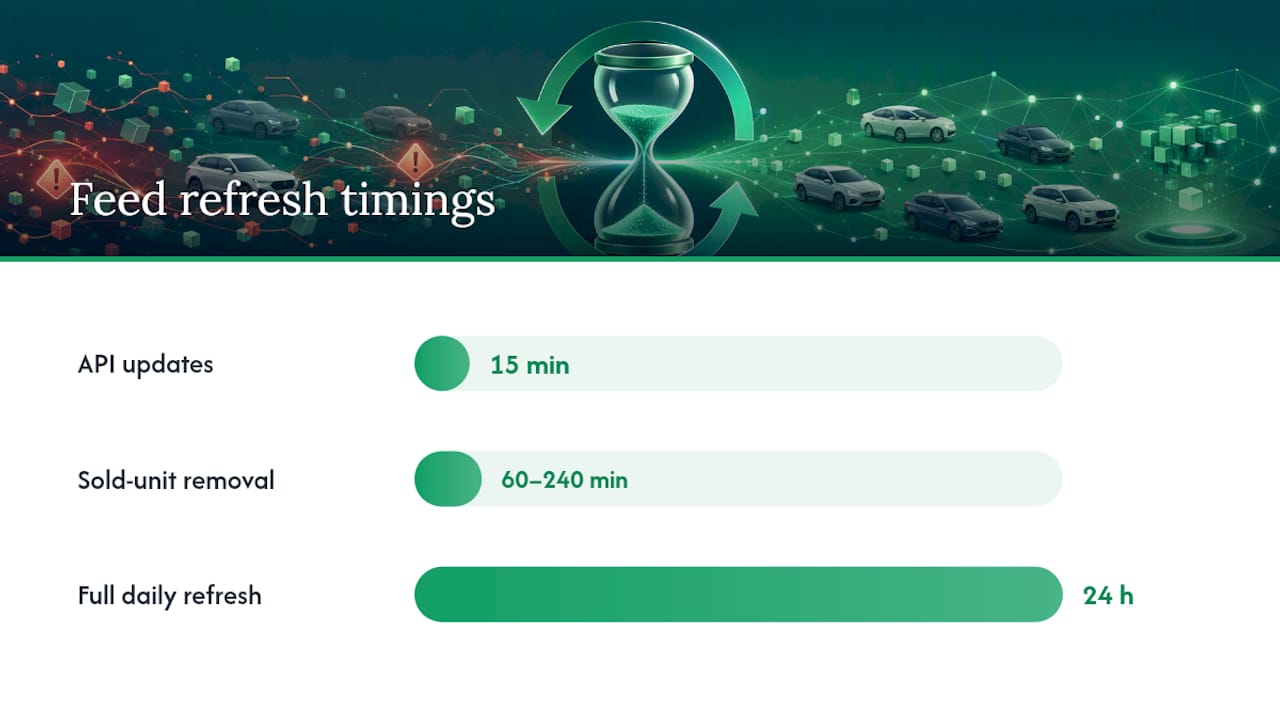
Third, pick a refresh cadence and stick to it. API-based feeds can update within 15 minutes, while older batch feeds often run once or twice a day. At minimum, run a full daily refresh, with incremental updates throughout the day for price and status changes. Sold-unit removal should hit somewhere in the 60 to 240 minute range depending on how fast your lot turns over.
Fourth, transform your feed per channel instead of sending the same file everywhere. Sending an identical feed to every partner increases rejection rates, since each channel has its own image specs and required fields.
- Field ownership: one system of record per field, documented and enforced.
- Validation gates: block, don’t warn, on VIN checksum, photo count, and price format.
- Cadence: daily full refresh minimum, incremental updates for anything time-sensitive.
- Per-channel transforms: match each partner’s spec rather than forcing a universal file.
Pro Tip: If your provider can’t commit to a stated sold-unit removal SLA, ask for one in writing and test it monthly by watching how fast a sold VIN actually disappears.
Which KPIs Tell You Your Feed Is Healthy?
You can’t manage what you don’t measure, and feed health degrades quietly until a customer walks in asking about a car you sold three days ago. Track a small, specific set of numbers weekly rather than a long dashboard nobody checks.
| KPI | Target |
|---|---|
| Feed age | Under 24 hours, ideally under 4 |
| Marketplace rejection rate | Under 2% |
| Sold-unit removal time | 60 to 120 minutes |
| VIN completeness | All live units |
| Photo completeness | Meets channel minimum on every VIN |
Industry guidance sets the sold-unit removal target at 60 minutes for high-turnover inventory, a number worth pinning to your review process since it directly affects phantom inventory complaints. Fifteen minutes a week is cheap insurance against a lost sale from a listing nobody caught.
An Editor’s Take on Treating Inventory Like a Product
Most dealers treat their feed as an afterthought, something the website vendor handles. That’s backwards. Your inventory data is a product in its own right, and it deserves the same ownership and quality checks you’d apply to anything customer-facing.
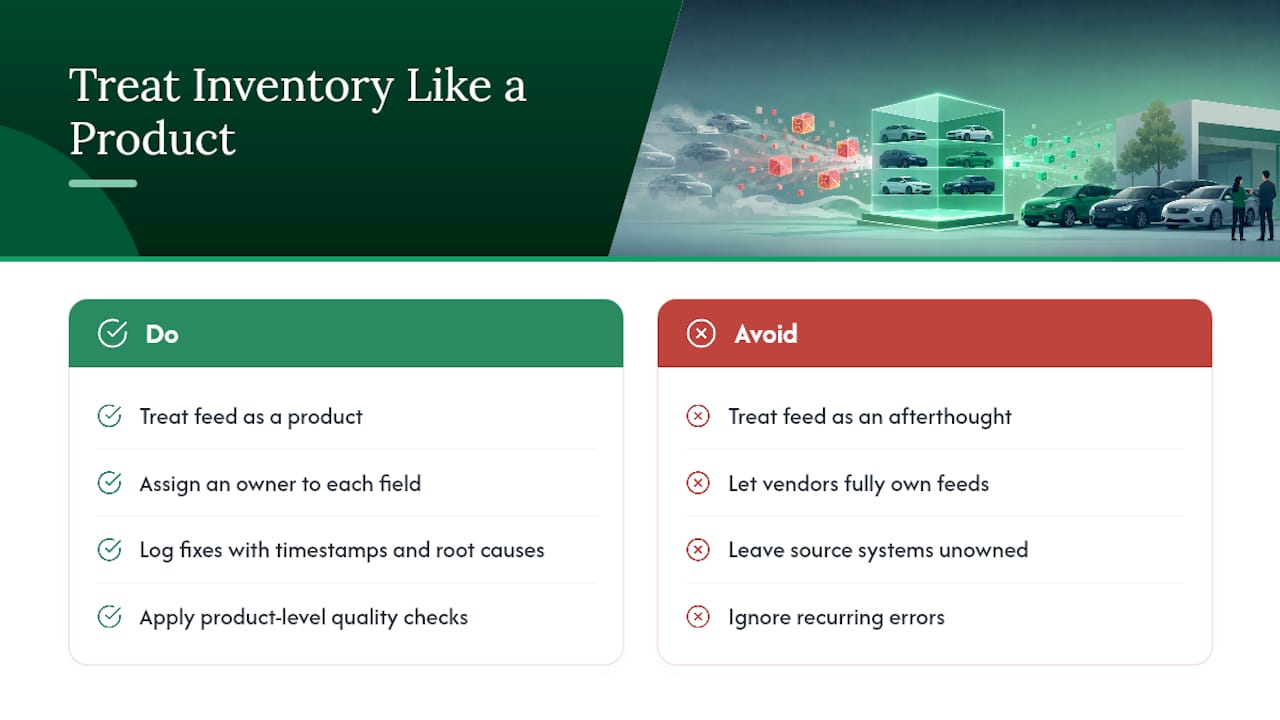
The recurring mistake isn’t technical, it’s organizational: nobody owns the fields, so nobody notices when three systems disagree about a price. An audit trail changes that. Once every fix gets logged with a timestamp and a root cause, patterns emerge fast, and you stop treating the same error as a surprise every time it resurfaces.
Every dealer I’ve talked to about feed errors eventually admits the same thing: the problem was never the marketplace. It was a source system nobody had assigned an owner to.
— Eric Dosset
How Loturn Keeps Your Inventory Data Clean
Loturn ties every cost, photo, and status change to a single VIN-linked record, so there’s no guessing which system is telling the truth about price or sold status. That single-source approach is the fastest way to stop the field-ownership disputes that cause most recurring feed errors.
Every update in Loturn writes to an audit log, so when a listing goes wrong, you can see exactly what changed, who changed it, and when, instead of reconstructing the timeline from memory. Pair that with secure data import (Loturn uses bank-level encryption and offers free setup assistance to migrate existing inventory), and a dealer switching over doesn’t lose historical records in the process. A dealer running validation on VIN and price fields before publish, rather than after a customer complaint, catches the kind of error that otherwise costs a wasted trip to the lot.
If your current setup makes cost tracking and feed accuracy feel like two separate jobs, they don’t have to be. Check out Loturn’s inventory features to see how per-car records and validation work together, or visit Loturn to start a free trial.
Where to Check Feed Health Right Now
- Google’s vehicle listings integration guide explains required fields and upload frequency for that channel’s diagnostics.
- Feedonomics’ guide to fixing marketplace errors breaks down why suppressed listings happen and how to recover fast.
- Loturn’s Dealer Academy has step-by-step playbooks for inventory management beyond feed troubleshooting.
Sources
- How to save time fixing errors on marketplaces | Feedonomics
- Integration process — vehicle listings | Google Developers
- 2026 Vehicle Feed Health Checklist & VLA Quality Score Guide | Savvy Dealer
FAQ
What Causes Most Inventory Feed Errors?
Field mapping mismatches between your DMS and the receiving channel cause most errors, followed closely by broken image links and stale sold-unit statuses that never synced.
How Fast Should a Sold Vehicle Disappear From Listings?
Industry guidance points to a 60-minute target for high-turnover used inventory, with 60 to 120 minutes as an acceptable working range.
Can Loturn Prevent Feed Errors on Its Own?
Loturn reduces the root causes by linking every cost and status change to one VIN-based record with an audit log, which removes the field-ownership confusion that causes many recurring errors.
How Often Should I Refresh My Inventory Feed?
At minimum once daily, though API-based feeds refreshing within 15 minutes cut stale listings far more effectively than older batch uploads running once or twice a day.
What’s the First Thing to Check When a Listing Won’t Publish?
Open the channel’s diagnostics or partner portal first. It shows the exact rejection reason rather than leaving you to guess at which field failed validation.