
Invoice processing automation turns a manual, error-prone accounts payable workflow into a mostly touchless, exception-managed operation. If your team is manually keying invoice data, chasing approvals over email, or reconciling mismatches at month-end, the case for automating is already there.
Three signs you should act now:
- Your AP team processes more than 200 invoices per month and cycle time is longer than five business days
- Your exception or error rate on incoming invoices exceeds 10–15%
- Approval cycles routinely delay payments, damaging vendor relationships or costing early-payment discounts
The payoff is concrete. Finance teams that automate invoice processing typically cut processing time substantially, reduce per-invoice costs notably, and drop error rates to near zero on straight-through invoices. Those aren’t vendor marketing numbers; they’re the ranges that show up consistently across independent benchmarks and practitioner case studies. The rest of this guide explains how to get there.
Table of Contents
- How does invoice processing automation actually work?
- What core features should you expect from invoice automation software?
- What are the real benefits and ROI of automating invoices?
- What does a typical implementation timeline look like?
- How do you evaluate and choose the right vendor?
- What integrations do you need to verify before going live?
- Why should you treat invoice automation as an agentic workflow?
- Key Takeaways
- The gap between what automation promises and what actually ships
- Loturn gives independent dealers built-in AP automation tied to every car
- Useful sources and a vendor demo checklist
- FAQ
How does invoice processing automation actually work?
The process runs in five stages, and understanding each one helps you ask better questions during vendor demos.
Intake and ingestion. Invoices arrive through multiple channels: email attachments, supplier portals, EDI feeds, scanned paper, and increasingly, direct API connections from supplier billing systems. A well-designed system monitors all of these simultaneously, often running a continuous inbox agent that picks up new documents within minutes of arrival. Consolidated PDFs (one file, multiple invoices) get split automatically before processing begins.
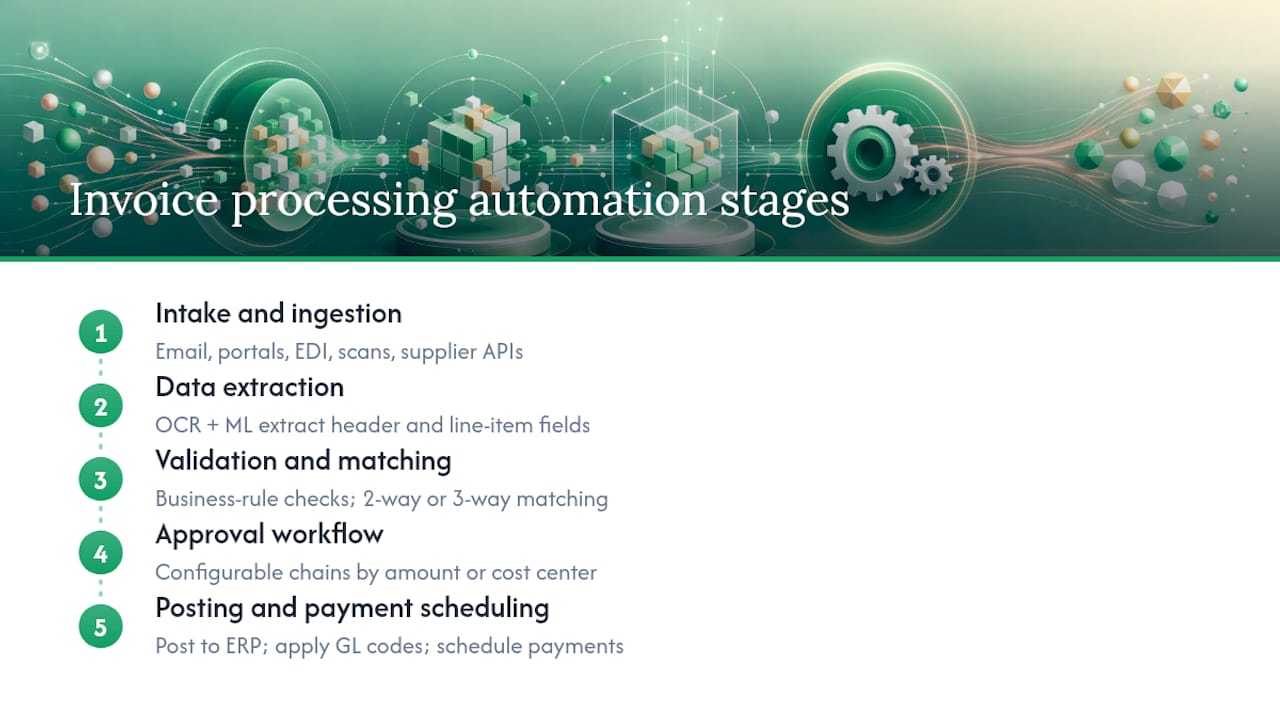
Data extraction. Once ingested, the system applies OCR (optical character recognition) combined with machine learning models to pull header fields (vendor name, invoice number, date, total) and line-item detail (description, quantity, unit price, GL code candidates). AI and ML technologies can extract invoice fields automatically and feed them into billing software without manual re-keying. The quality of this extraction step determines everything downstream, which is why confidence scoring matters: the system assigns a probability score to each extracted field and flags low-confidence values for human review rather than silently passing bad data forward.
Validation and matching. Extracted data gets validated against business rules (does the vendor exist in the master file? is the currency correct? does the total match the line items?) and then matched against purchase orders and receiving records. Two-way matching checks the invoice against the PO; three-way matching adds the goods receipt or delivery confirmation. Mismatches become exceptions, not failures, and get routed to the right person automatically.
Approval workflow. Invoices that pass matching move through a configurable approval chain based on amount thresholds, cost center, GL account, or business unit. The system routes, reminds, and escalates without human coordination. Non-PO invoices (services, utilities, subscriptions) follow separate rules-based paths.
Posting and payment scheduling. Approved invoices post directly to the ERP or accounting system, with GL coding applied automatically. Payment runs get scheduled based on due dates and early-payment discount windows. A step-by-step implementation approach confirms that mapping extracted outputs directly to your ERP fields is the critical last step that closes the loop.
Pro Tip: Ask every vendor to show you a live exception: pick a deliberately mismatched invoice during the demo and watch how the system surfaces it, routes it, and logs the resolution. That single test tells you more than any slide deck.
What core features should you expect from invoice automation software?
Not every feature on a vendor’s marketing page moves the needle equally. Here is how to separate the must-haves from the nice-to-haves.
Must-have features for straight-through processing:
- Universal ingestion: email, portal, EDI, scanned paper, and API — if a vendor only handles one or two channels, you will still have manual work
- Header and line-item extraction: header-only extraction is a 2015 capability; line-item extraction is table stakes for any PO-driven workflow
- Two-way and three-way PO matching: with configurable tolerance rules (e.g., allow a 2% price variance before flagging)
- Configurable rules engine: amount thresholds, vendor categories, GL mapping, and approval chains that your team can edit without a developer
- Approval workflows with escalation: time-based escalation so invoices don’t stall when an approver is out
- Audit trail: every action, every change, every approval logged with timestamp and user ID, tamper-evident
- ERP/GL posting: direct posting via pre-built connector or API, not a CSV export
Features worth having at scale:
- Vendor self-service portal for status inquiries and document submission
- Analytics dashboard with KPI tracking (STP rate, cost per invoice, exception rate)
- Multi-entity and multi-currency support
- API access for custom integrations
Pro Tip: When a vendor claims “AI-powered extraction,” ask them to show you their confidence score distribution on a real invoice batch. A healthy system should show 85–95% of fields above the auto-approve threshold. If they can’t show you that data, the AI claim is marketing.
Platforms like those reviewed on G2 for document capture tools show that ease of configuration and support responsiveness consistently rank as top differentiators in practitioner reviews, often above raw accuracy claims.
What are the real benefits and ROI of automating invoices?
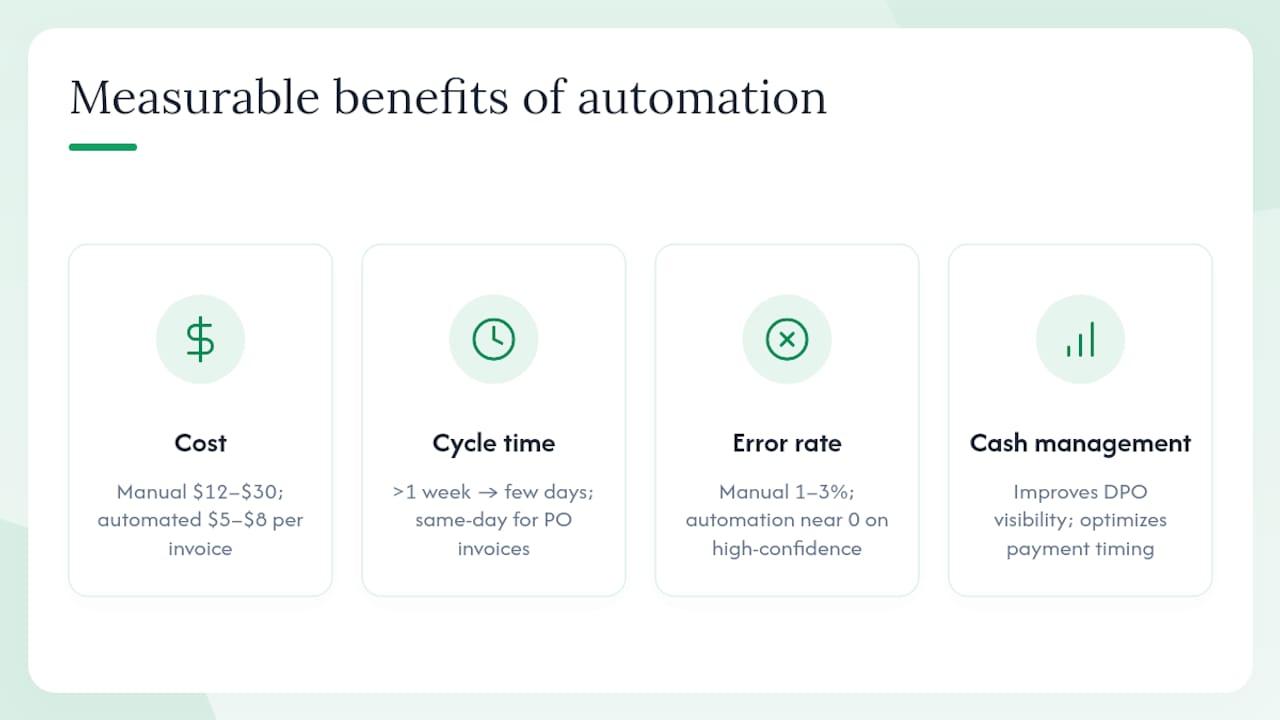
The business case for electronic invoice processing rests on four measurable levers.
Cost per invoice. Manual AP processing typically costs between $12 and $30 per invoice when you factor in labor, error correction, and late-payment penalties. AP automation pricing benchmarks show that automated processing can bring that figure down substantially, though the actual range varies by invoice complexity, industry, and the vendor and features you choose. The gap between manual and automated cost per invoice is where most ROI calculations start.
Cycle time. A manual invoice that takes over a week from receipt to payment approval can drop to a few days or less with automation, sometimes same-day for clean PO-matched invoices. That speed directly affects your ability to capture early-payment discounts, which typically run 1–2% of invoice value for net-10 terms.
Error and exception rates. Manual data entry error rates in AP commonly run 1–3%. Even a 1% error rate across thousands of invoices per month creates a significant rework burden. Automated extraction with confidence scoring cuts that to near zero on high-confidence invoices and concentrates human effort on the genuinely ambiguous cases.
Cash management. Faster, more predictable invoice processing improves days payable outstanding (DPO) visibility. When you know exactly which invoices are approved and when they’re due, you can optimize payment timing rather than paying early by default to avoid disputes.
A simple 12-month ROI sketch: A team processing 1,000 invoices per month at $20 per invoice (manual) spends $240,000 annually on AP processing. If automation brings that to $5–8 per invoice, the annual saving is $144,000–$180,000 before factoring in early-payment discount capture or headcount redeployment. Typical software costs and implementation fees for a mid-market deployment run well below that saving in year one.
One important caution: STP (straight-through processing) rates vary widely by invoice type. PO-based invoices from established suppliers often achieve high STP rates. Non-PO service invoices, consolidated statements, and invoices from new vendors tend to require more configuration and human review, at least initially.
What does a typical implementation timeline look like?
Most mid-market deployments follow four phases. Rushing any of them is where projects go sideways.
Discovery (1–3 weeks). Map your current invoice volume, channels, and formats. Identify your top 20–30 suppliers by volume and document their invoice formats. Audit your ERP chart of accounts and GL coding rules. This phase surfaces the data quality issues that will slow you down later.
Pilot (4–8 weeks). Run a controlled batch of 500–2,000 invoices through the new system in parallel with your existing process. Pick a supplier cohort with relatively clean, consistent invoice formats for the first pilot. Measure STP rate, extraction accuracy, and exception volume against your baseline.
Integration and validation (4–12 weeks). Build and test the ERP connector, validate GL posting end-to-end in a sandbox, confirm approval workflow routing, and complete user acceptance testing. The range here is wide because ERP complexity and data cleanup requirements vary enormously.
Phased rollout. Bring supplier cohorts on in waves, not all at once. Start with high-volume, low-complexity suppliers, then add complex or exception-heavy ones after the system is tuned.
Stakeholders to involve:
- Vendor management: — coordinates supplier onboarding to the portal
- Legal/compliance: — reviews data processing agreements and security certifications
Common cost drivers beyond software licensing: data cleanup before go-live, custom ERP integrations (especially for older on-premise systems), multi-entity configuration, user training, and ongoing support tiers. Pre-built connectors and integration accelerators reduce implementation time and risk compared to custom-coded integrations, which is a meaningful factor when comparing vendor proposals.
How do you evaluate and choose the right vendor?
Vendor selection is where most finance teams either build a durable process or inherit someone else’s problems. Here is a structured approach.
Core evaluation criteria
| Criterion | What to assess |
|---|---|
| Capture accuracy | Line-item extraction rate and confidence score distribution on your actual invoice formats |
| PO matching and exception handling | Configurable tolerance rules, exception routing logic, resolution tracking |
| ERP connectors | Pre-built vs. custom; which ERP versions are supported; posting validation in sandbox |
| Security and compliance | SOC 2 Type II, ISO 27001, data residency options, role-based access |
| Scalability | Multi-entity, multi-currency, volume pricing at 2x your current volume |
| Pricing model | Per-invoice vs. subscription vs. seat-based; what happens at volume spikes |
| Support and onboarding | Dedicated implementation manager, SLA for support tickets, training materials |
Twelve questions to ask during vendor demos
- Show me extraction on three of our actual invoice formats, including one that is a scanned PDF.
- What is your confidence score threshold for auto-approval, and can we configure it?
- How does the system surface and route an exception? Walk me through a live example.
- What is your SLA for support tickets, and what is the escalation path?
- Which ERP versions do you have pre-built connectors for, and when were they last updated?
- Can you show me the audit log for a single invoice from receipt to payment?
- How does multi-entity posting work if we have separate GL instances?
- Can we get sandbox access before signing a contract?
- What does your implementation methodology look like, and who owns the project on your side?
- What is on your product roadmap for the next 12 months?
- Can you provide two or three customer references in our industry or at our invoice volume?
- How does your pricing change if our volume doubles?
Red flags to watch for
- No sandbox access before contract signing
- Vague or unwritten SLAs (“we respond quickly”)
- Template-only extraction with no ML adaptation to new formats
- No documented integration experience with your specific ERP
- STP rate claims with no supporting data or reference customers
Suggested pilot scoring template: Weight capture accuracy at 30%, ERP integration quality at 25%, exception handling at 20%, security/compliance at 15%, and support/onboarding at 10%. Score each vendor 1–5 on each criterion and multiply by the weight. The weighted total gives you a defensible, comparable score across vendors.
What integrations do you need to verify before going live?
Integration is where most implementation surprises hide. A system that processes invoices beautifully but can’t post to your ERP without a manual export is not automation.
Common integration targets and patterns:
- ERP systems (SAP, Oracle, Microsoft Dynamics, NetSuite, QuickBooks): pre-built connectors are the fastest path; API sync is the most flexible; file-based SFTP/CSV is the fallback for legacy systems
- Procurement platforms: PO data sync is required for matching; real-time sync beats batch
- Payment rails: ACH, virtual card, or check runs triggered from approved invoices
- Document management systems: for archiving and audit retrieval
- Middleware and iPaaS platforms: when a direct connector doesn’t exist, API-based middleware reduces custom code and maintenance burden
Pre-built connectors materially reduce project risk. Integration case studies consistently show faster time-to-value when standard connectors are available versus custom-coded integrations, which require ongoing maintenance as ERP versions update.
IT compatibility checklist before go-live:
- Data mapping: confirm GL account codes, cost centers, and vendor master fields match between systems
- User and role mapping: define who can approve, post, and view invoices in each system
- SSO and provisioning: confirm identity provider compatibility
- Sandbox testing: validate end-to-end posting in a non-production environment before any live data touches the system
- Automated posting permissions: confirm the service account has the right ERP permissions without over-provisioning
- Rollback and reconciliation: document the procedure for reversing a batch of incorrectly posted invoices
Multi-entity setups add a layer of complexity. If you have separate GL instances per entity, confirm whether the vendor supports cross-entity posting rules natively or whether you need separate configurations per entity. Some platforms handle this elegantly; others require parallel deployments that multiply your maintenance burden.
Why should you treat invoice automation as an agentic workflow?
Most finance teams think of invoice automation as a smarter data-capture tool. That framing undersells it and leads to underperforming deployments.
The better mental model is agentic automation: the system actively monitors intake channels, manages exceptions, learns from human corrections, and improves its own accuracy over time. This is fundamentally different from a static template-based extraction tool that applies fixed rules to fixed formats and breaks when a supplier changes their invoice layout.
An agentic system does three things a template-based one cannot. It monitors continuously (not in scheduled batches), it routes exceptions with context (not just a flag), and it updates its extraction models based on how humans resolve corrections. That last capability is what drives STP rate improvement from 60% at go-live to 85%+ at six months.
Governance template for agentic pilots:
- Define auto-approve confidence thresholds before go-live (e.g., auto-approve fields above 92% confidence; queue fields between 75–92% for review; reject below 75%)
- Log every human correction with the corrected value and the original extracted value
- Schedule a monthly rules review in the first six months to update GL mapping, vendor master data, and tolerance rules
- Set a change-control process for model updates: who approves changes, how they’re tested, and how rollback works
Pro Tip: During a pilot, track three metrics weekly: the rate at which the system’s confidence scores improve on previously low-confidence fields (learning rate), the reduction in manual corrections per 100 invoices week-over-week, and the average time-to-resolution for exceptions. Flat or worsening trends after week four signal a configuration problem, not a data problem.
The agentic framing also changes how you staff the transition. Instead of retraining AP clerks to use new software, you’re redefining their role: from data entry operators to exception managers and process owners. That shift requires different training and different success metrics.
Key Takeaways
Invoice processing automation delivers its strongest ROI when treated as an agentic, continuously learning workflow rather than a static data-capture tool, with governance, pilot KPIs, and ERP integration validated before full rollout.
| Point | Details |
|---|---|
| Start with a scoped pilot | Run a pilot with a controlled batch of invoices over several weeks with one clean supplier cohort before expanding. |
| Validate ERP integration in sandbox | End-to-end GL posting must be confirmed in a non-production environment before any live data flows. |
| Require SOC 2 Type II | Ask for the full audit report covering at least 12 months of operating effectiveness, not just a certificate. |
| Track STP rate weekly | Straight-through processing rate is the single best signal of whether the system is learning and improving. |
| Loturn for dealer AP | Independent used-vehicle dealers can tie vendor invoices directly to per-car recon costs using Loturn’s built-in accounting and AI document management. |
The gap between what automation promises and what actually ships
Most finance teams that struggle with invoice automation deployments share one pattern: they scoped the software decision carefully and scoped the implementation loosely. The vendor demo showed a clean, fast, high-accuracy system. The go-live showed a different picture, not because the vendor lied, but because three things were underestimated.
First, data quality. ERP vendor master files are almost always messier than anyone admits during the sales process. Duplicate vendor records, inconsistent naming, missing GL codes, and outdated bank details don’t surface until the system tries to match against them. Cleaning that data before go-live is unglamorous work, but skipping it means your STP rate starts at 40% instead of 75%.
Second, supplier onboarding time. Getting your top 50 suppliers to submit invoices through a new portal or in a new format takes longer than any vendor will tell you. Plan for 8–12 weeks of parallel running, not 2–4.
Third, the STP promises. Vendors quote STP rates from their best-case customers. Your STP rate at go-live will be lower, and that’s fine, as long as you’ve built a governance model that improves it over time. The teams that get frustrated are the ones who expected 85% on day one and got 55%. The teams that succeed treated 55% as a starting point and measured improvement weekly.
One practical mitigation for all three: involve procurement in the project from week one, not week eight. Procurement owns PO data quality and supplier relationships, the two inputs that most directly determine your match rate. Getting them in the room early turns a potential blocker into an accelerator.
Loturn gives independent dealers built-in AP automation tied to every car
Every dealer knows the frustration: a recon invoice arrives, gets paid, and then disappears into a general expense bucket with no connection to the vehicle it was for. That’s not an accounting problem; it’s a visibility problem, and generic AP automation tools don’t solve it.
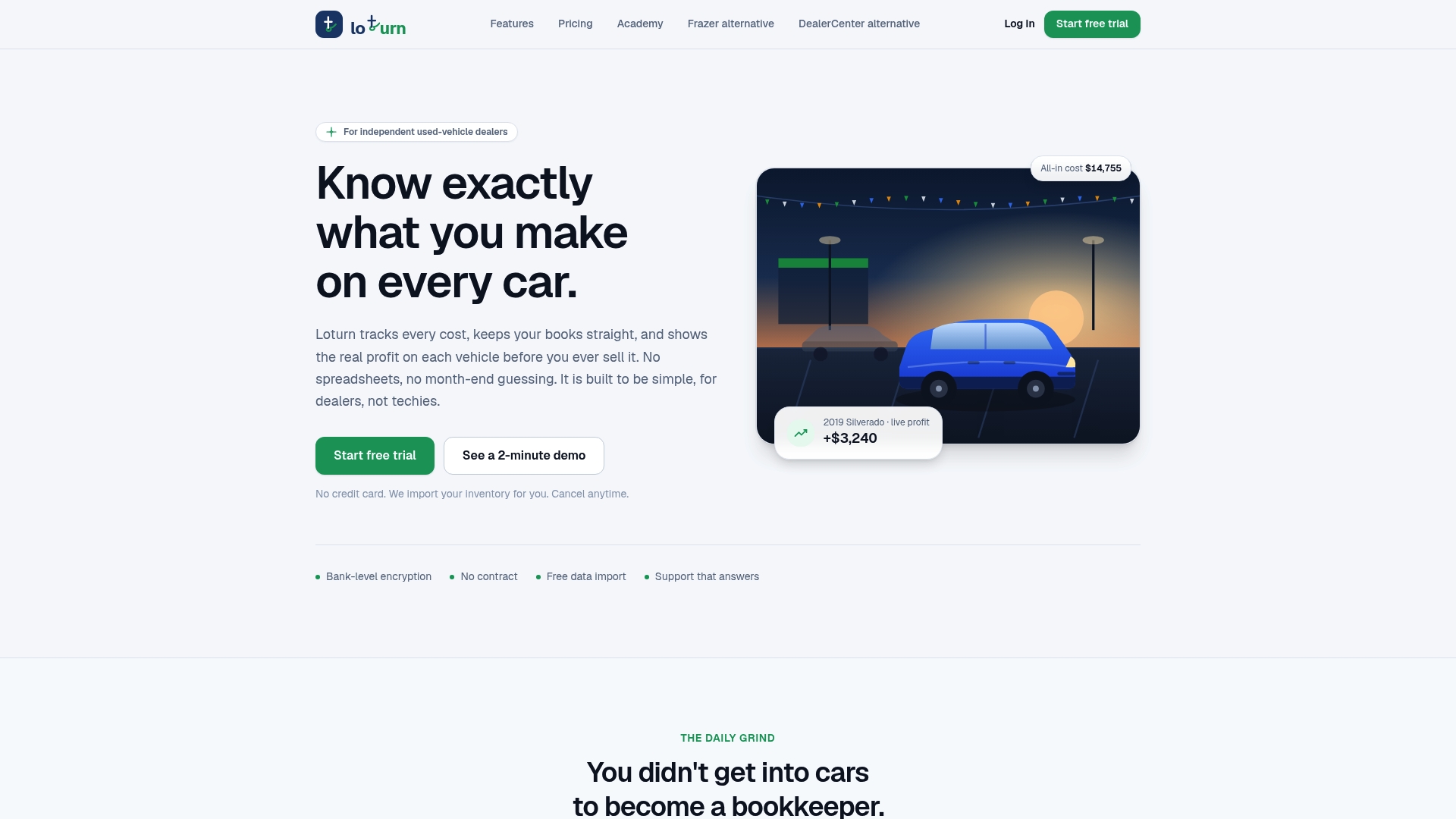
Loturn is built specifically for independent used-vehicle dealers, and its dealer accounting and AP features are designed around that exact workflow. Vendor invoices tie directly to individual vehicles, so transport costs, mechanical work, and detail expenses land against the right car automatically. The result is real per-car profit visibility before the sale, not a reconciliation exercise after it. Loturn also includes AI invoice and document management, bank-level encryption, and a quick setup with free data migration so you’re not spending weeks on implementation.
If you’re running a used-car, RV, boat, or trailer dealership and want AP processes that actually connect to your inventory and recon costs, Loturn is worth a close look. Start a free trial or schedule a demo at loturn.com to see how it fits your operation.
Useful sources and a vendor demo checklist
Authoritative reading for deeper research:
- How to Automate Invoice Processing? A Step-by-Step Guide - Klippa
- Automating Billing and Invoicing with AI | Thoughtful
- How Much Does AP Automation Cost? - MineralTree
- MuleSoft case studies
- Rossum reviews | G2
- Create and Send Invoices Online | Stripe Invoicing
Vendor demo checklist (bring to every call):
- Request sandbox access before contract signing
- Ask for a live GL posting demonstration in the sandbox
- Confirm the rollback and recovery procedure for a bad batch
- Request the SOC 2 Type II report under NDA
- Ask for two customer references at your invoice volume or in your industry
- Confirm which ERP version and connector version is in production today
FAQ
How do you automate the invoice processing workflow?
The core steps are: set up universal ingestion (email, portal, EDI), apply OCR and ML extraction to capture header and line-item data, run validation and PO matching, route exceptions automatically, and post approved invoices directly to your ERP. A practical step-by-step guide recommends validating each stage in a sandbox before going live with full volume.
Can AI handle invoice processing without human review?
AI can process a high percentage of invoices without human intervention, typically 75–90% for clean PO-matched invoices from established suppliers. The remaining invoices, those with low confidence scores, mismatches, or missing data, get routed to a human reviewer automatically. The goal is not zero human involvement but concentrating human effort on the cases that genuinely need judgment.
How much does AP automation cost per invoice?
Per-invoice costs vary by vendor and the features you choose, but manual AP processing typically runs $12–$30 per invoice, and automation can bring that figure down substantially. The actual cost depends on invoice complexity, volume, and whether you’re using a per-invoice or subscription pricing model.
Does Loturn automate invoice processing for car dealers?
Loturn includes AI invoice and document management built into its dealer accounting platform, with vendor invoices tied directly to individual vehicles for per-car profit tracking. It’s designed for independent used-vehicle dealers, not general AP departments, so the workflow connects recon and transport costs to inventory rather than to a generic expense ledger.
What KPIs should you track after going live?
Track straight-through processing (STP) rate, cost per invoice, exception rate, average processing time from receipt to approval, and days payable outstanding (DPO). STP rate is the most sensitive early indicator: if it’s not improving week-over-week in the first 90 days, the system needs configuration attention, not more time.