The dealers winning on lead conversion right now run an omnichannel, CRM-integrated automation cadence that reaches a new lead within minutes of submission, keeps trying across call, text, email, and chat, and hands off any reply showing real buying intent to a human within seconds. That combination reverses the two biggest sources of lost deals: slow first response and single-channel dead ends. Do this well and you book more appointments from the same ad spend, not more leads.
TL;DR:
- The most effective follow-up automation reaches new leads within five minutes using multi-channel, AI-driven cadences that adapt based on customer responses.
- Proper integration of webhook triggers, real-time data sync, and escalation rules ensures automation remains responsive, compliant, and linked to accurate lead sources.
- A phased rollout focusing on setting a reliable day-zero sequence, staff training, and data hygiene enhances system stability and long-term success.
- Custom, focused templates with clear calls to action and behavior-based adjustments outperform generic messages in driving appointments.
- Tracking response times, appointment, and show rates with proper attribution justifies automation investments by highlighting incremental revenue growth.
Table of Contents
- What Is Dealership Follow-Up Automation?
- Why Follow-Up Fails and How Automation Fixes It
- What Cadence and Channel Mix Actually Convert Leads?
- How Should the Tech Stack Be Wired?
- Rolling Out Automation: A Phased Implementation Plan
- Templates and Scripts Worth Stealing
- How Do You Measure Whether It’s Working?
- How Loturn Fits Into Your Follow-Up Workflow
- Common Traps and What to Prioritize First
- See Loturn’s Pricing and Book a Walkthrough
- Sources
- FAQ
What Is Dealership Follow-Up Automation?
Dealership follow-up automation is the use of software, triggered messaging sequences, and often AI to contact, qualify, and re-engage sales leads across multiple channels without relying on a salesperson to remember to make the next call. It sits on top of your CRM and connects to your website forms, chat widget, phone system, and sometimes your DMS, so a lead generated at 9 p.m. on a Sunday gets a text and an email before your morning up-desk meeting even starts.
That distinction matters because most dealerships already own some version of “automation.” A CRM that fires a single templated email when a lead comes in is not the same thing. Real follow-up automation branches based on what the customer does: opens the email, ignores three texts, replies with a question about financing, or shows up as a repeat website visitor. It is a decision engine, not a mail merge, and that difference is the whole reason it outperforms manual follow-up and legacy autoresponders alike.
Why Follow-Up Fails and How Automation Fixes It
Most missed opportunities come down to three failure points: latency, task debt, and single-channel thinking. A lead comes in from a paid listing at 6:45 p.m., the assigned rep is with a walk-in, and the notification sits in an inbox until the next shift. By the time anyone calls, the customer has already heard back from two other dealers.
Task debt compounds the problem. A BDC rep juggling 60 open leads cannot manually track who needs a day 3 touch versus a day 14 touch, so the leads that do not respond immediately quietly fall off the list. Internet sales and BDC roles are built around exactly this kind of sustained contact management, which is why staffing data for these positions points to follow-up cadence ownership as a core job function, not a side task. When the volume outpaces the person, the system needs to carry the load instead.
Single-channel follow-up is the third leak. A rep who only calls will miss the customer who screens unknown numbers but answers texts in seconds. Dealers who instrument the same lead across phone, SMS, email, and chat consistently keep more leads warm because they are meeting the customer on whatever channel that person actually checks.
The industry benchmark: getting a real human response to a new lead within five minutes during business hours is what NADA’s dealer performance data identifies as a key driver of conversion. Every hour past that window measurably erodes the odds of a booked appointment.
Automation attacks all three problems at once:
- It removes latency by firing the first touch in seconds, regardless of staffing gaps or shift changes.
- It eliminates task debt by tracking every open lead’s position in the cadence automatically, so nobody “forgets” a day 7 follow-up.
- It restores multi-channel coverage by running call, text, and email in parallel instead of leaving channel choice to whichever rep is available.
AI-assisted platforms are accelerating this shift. Coverage of newer entrants like flai shows the market moving toward always-on systems that hold conversational context across channels, so a customer who texts back three days later isn’t starting from zero. That persistence, paired with a clean handoff the moment a lead asks a real question, is the mechanism behind the conversion lift dealers report.
What Cadence and Channel Mix Actually Convert Leads?
Speed matters, but so does the order and spacing of touches. The first hour is the highest leverage window you have, and it should never rely on a single channel working alone.
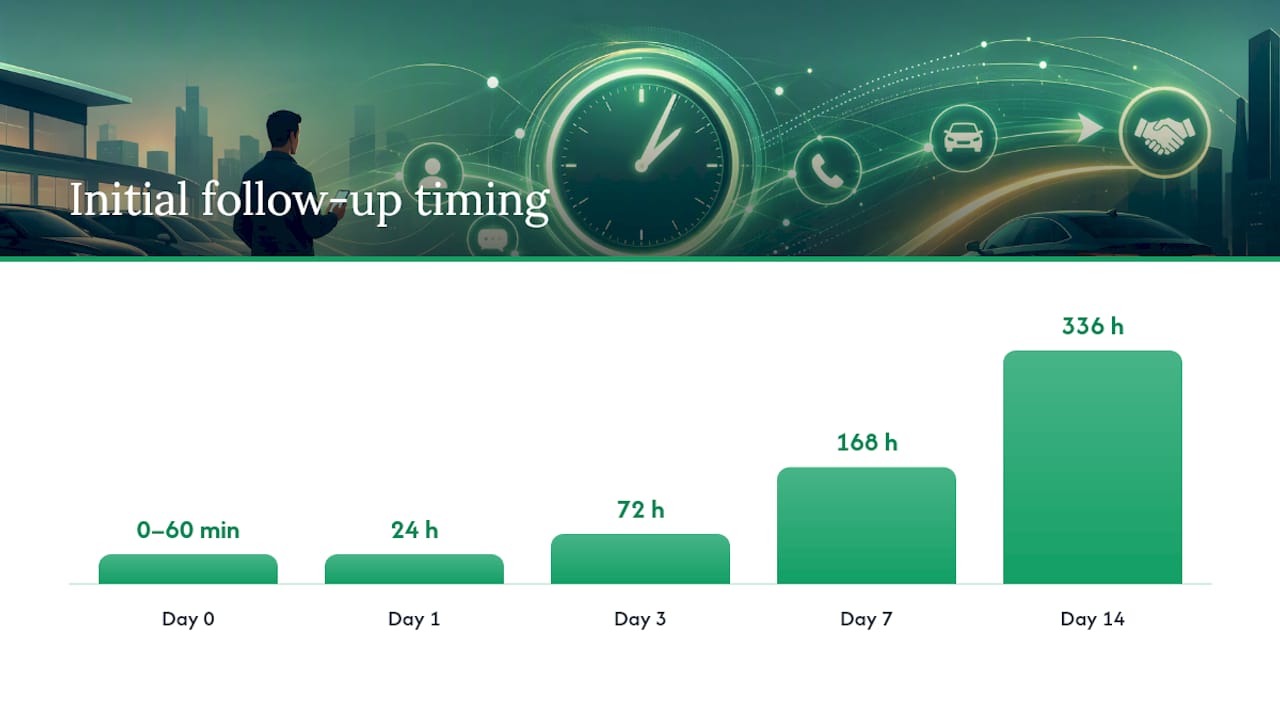
A workable day-zero sequence looks like this: attempt a call first, and if it goes unanswered within a ring or two, follow with an SMS inside the same five-minute window, then send a personalized email shortly after. Web chat leads should get a near-instant chat reply that mirrors this same urgency, since a customer actively on your site is your warmest possible signal. After that first hour, cadence should shift from urgency to persistence.
Behavior should change the sequence in real time, especially when a customer replies with a question about financing options that can be addressed promptly. A reply of any kind should pause the automated cadence immediately so a human can take over the conversation. A customer who clicks a vehicle link twice or opens three emails in a day should get bumped up the priority list and possibly escalated to a call attempt sooner than scheduled. Silence, on the other hand, should stretch the interval out rather than repeat the same message on a fixed clock.
After-hours and quiet-hours rules are not optional. Text messages sent late at night or before business hours create both a poor customer experience and legal exposure under the Telephone Consumer Protection Act, so cadences need built-in time windows and a clear, honored opt-out path on every SMS touch.
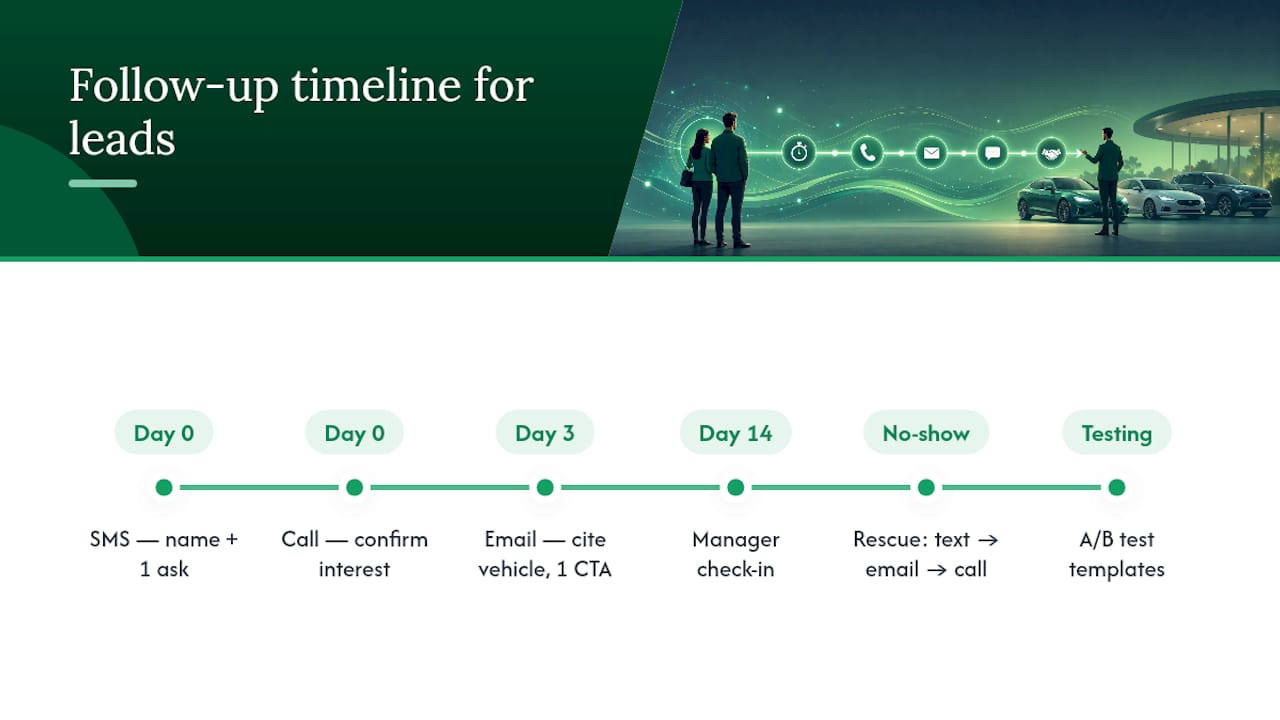
Here is a sample cadence structure many dealers use as a starting template:
| Day | Channel(s) | Trigger / goal |
|---|---|---|
| Day 0 (0 to 60 min) | Call, then SMS, then email | Confirm interest, offer a specific appointment time |
| Day 1 | Email + SMS | Answer likely questions (financing, trade-in, availability) |
| Day 3 | Call attempt + SMS | Re-engage with a soft offer (test drive, virtual walkaround) |
| Day 7 | Highlight similar inventory or a price update | |
| Day 14 | SMS + manager email | Manager-branded check-in, last direct appointment ask |
| Ongoing | Monthly email nurture | Inventory alerts, service reminders, seasonal offers |
Practical guides on BDC email templates recommend exactly this kind of layered, multi-touch structure through the first fourteen days, with a longer nurture track for leads that never convert on the first pass. Treat the table above as a starting point, not a fixed rulebook. Vehicle type, lead source, and your own show-rate data should adjust the spacing over time.
How Should the Tech Stack Be Wired?
The architecture question comes down to where each layer of logic lives. Your sequence engine should own timing, channel selection, and message branching. Your CRM should own the lead record, ownership assignment, and the source of truth for status. AI has the clearest value in three spots: drafting and personalizing message content at scale, tagging incoming replies by intent (price question, financing question, ready to book), and, increasingly, handling live voice conversations for basic qualification before routing to a person.
Getting this right depends on a handful of integration and hygiene decisions that are easy to skip early and expensive to fix later.
- Webhook triggers need to fire the moment a lead hits your CRM, your website form, or your chat tool, not on a batch delay.
- Calendar and DMS sync should confirm appointment slots in real time so automation never books a time that’s already gone.
- Retry queues need to catch failed sends (bad phone numbers, bounced emails) and flag them for manual review instead of silently dropping the lead.
- Audit logs should record every automated touch, so if a customer disputes contact frequency or a compliance question comes up, you have a timestamped record.
- Minimum required fields for reliable routing include a valid phone number, lead source, vehicle of interest, and a timestamp, without which attribution and routing both break down.
A CRM built for dealer follow-up needs clean field mapping between the source (paid listing, website form, walk-in re-engagement) and the CRM record, because attribution reporting is only as good as the lead source tag attached at intake.
Pro Tip: Build a dead-letter queue for messages that fail to send, and review it daily. A lead whose text bounced because of a typo’d phone number is not a lost cause, it’s a data entry fix away from a booked appointment. Pair that with a hard rule: any reply containing words like “price,” “trade,” or “today” routes to a human within two minutes, no exceptions.
Escalation rules matter as much as the automation itself. Define upfront which intent signals require an immediate human takeover, and audit unresolved conversations at least once a day so nothing sits untouched in the queue overnight.
Rolling Out Automation: A Phased Implementation Plan
Trying to automate every lead source and every cadence in week one is the most common way dealers sabotage a rollout. A phased approach protects your existing pipeline while you build confidence in the system.
- Phase 0, prepare (week 1). Define your baseline KPIs before you change anything: current response time, appointment rate, and show rate. Pick one or two pilot lead sources, usually your highest-volume paid channel, and clean up required fields (phone, source, vehicle interest) so routing works from day one.
- Phase 1, pilot (weeks 2 to 5). Configure the day-zero cadence for the pilot source only, set clear handoff service-level agreements (a two-minute response target for any intent-tagged reply is reasonable), and run the pilot for two to four weeks while tracking every metric daily, not just at the end.
- Phase 2, iterate and scale (weeks 6 to 10). Add the no-show rescue and long-term nurture sequences, expand the automation to additional lead sources one at a time, and document standard operating procedures so new hires can run the system without tribal knowledge.
- Phase 3, govern (ongoing). Assign clear ownership of the automation (usually the BDC manager or internet sales director), set a monthly reporting cadence to sales leadership, and build in a recurring compliance check on opt-outs and quiet-hours rules.
Governance is where a lot of pilots quietly fail after a strong launch. A few things worth locking down early:
- Name one owner accountable for the automation’s performance, not a committee.
- Set escalation paths in writing: who gets pinged when a lead goes unresolved for more than 24 hours.
- Run a compliance check on opt-out handling and quiet hours at least quarterly.
- Report the same three or four KPIs to leadership every month so trends are visible, not anecdotal.
A documented cadence framework helps here, since the biggest risk in Phase 2 is scope creep without a clear reference point for what “the standard cadence” actually is.
Templates and Scripts Worth Stealing
Generic “just checking in” messages consistently underperform templates built around one specific ask and one piece of personalization: the customer’s name and the vehicle they inquired about. Keep every message built around a single call to action, ideally an appointment time, not multiple asks stacked in one message.
Day 0 SMS (within minutes): “Hi [Name], this is [Rep] from [Dealership]. I’ve got the [Year Make Model] you asked about pulled up. Are you free for a quick call, or would tomorrow at 10 or 2 work better for a look?”
Day 0 call opener: “Hi [Name], I saw you were checking out the [Vehicle] online, just wanted to make sure you got the details you needed and see if a test drive this week makes sense.”
Day 3 email subject line: “Still thinking about the [Vehicle]?” Body: reference the specific trim or feature they viewed, answer one likely objection (financing, trade value), and close with a single appointment link.
Day 14 manager touch: “Hi [Name], this is [Manager Name], sales manager at [Dealership]. I noticed you hadn’t had a chance to connect with our team yet. Anything I can help clarify before you make a decision?” Manager-branded messages consistently get replies that rep-level messages don’t, simply because they read as a genuine check-in rather than a script.
No-show rescue sequence: text within 30 minutes of the missed appointment, follow with an email offering to reschedule same-day if possible, and escalate to a phone call if there’s no response within a few hours. Feed the rebooking directly into your calendar system so a customer who does respond can pick a new time without another round of back-and-forth. Template libraries built for this exact use case are worth reviewing for wording. However, always test subject lines and CTAs against your own reply data rather than assuming any published template performs identically at your store.
Run every template through basic A/B testing: two subject lines, two SMS openers, tracked separately for two to three weeks before declaring a winner.
How Do You Measure Whether It’s Working?
Track two tiers of metrics. Primary KPIs are response time (minutes from lead creation to first contact attempt), appointment rate (leads that book a visit divided by total leads), show rate (booked appointments that actually show), and overall conversion to sale. Secondary KPIs include cost per appointment and reply rate by channel.
Attribution requires tagging every appointment with its source: automation-initiated or human-initiated. Without that tag, you cannot tell whether the automation is actually driving incremental appointments or just taking credit for ones a rep would have booked anyway.
A simple dashboard needs four numbers updated daily: average response time, appointment rate this week versus last week, show rate, and cost per appointment. Set an alert threshold, for example flagging any day where average response time exceeds 15 minutes, so problems surface before a full reporting cycle passes.
- ROI math starts with your recovered appointments: appointments you would have lost to slow or abandoned follow-up, multiplied by your average gross per sale and your close rate.
- Compare that recovered value against your per-lead ad spend, using NADA’s benchmark data as a reference point for typical acquisition cost per unit.
- Even a conservative lift in appointment rate, when applied across a month of paid leads, tends to justify the cost of the automation tooling itself within one or two sales cycles.
How Loturn Fits Into Your Follow-Up Workflow
Automation is only as good as the data feeding it, and that is where the CRM and the rest of your dealer platform need to work together rather than live in separate silos. Loturn’s integrated CRM keeps lead records tied to per-vehicle context, so a follow-up message can reference the actual car, its price, and its status without a rep manually checking three systems first.
- Deal paperwork tied to the same platform means a booked appointment that turns into a sale flows straight into deal paperwork automation instead of a second manual handoff.
- Loturn’s onboarding includes data import services to help existing lead history and vehicle records migrate over efficiently.
- Strong encryption protects customer contact data as it moves between your CRM, follow-up sequences, and deal records.
- Mapping your lead fields against your current system is a reasonable first step before flipping on any new cadence.
Common Traps and What to Prioritize First
The biggest mistake teams make is automating the parts of the conversation that require a human, like negotiating price or explaining finance terms, instead of automating the scheduling and persistence work around those conversations. Automation should get a customer to the table faster. It should not try to close the deal.
Prioritize three things in order: a reliable day-zero cadence, a manager-touch template for stalled leads, and clean lead data. Skip data hygiene and every other fix is built on sand. Give the rollout a real quarter before judging results, and expect to adjust staffing as response volume shifts from reactive to proactive.
— Eric Dosset
See Loturn’s Pricing and Book a Walkthrough
Follow-up automation gets a lead to the appointment. What happens after that, tracking whether the deal actually made money, is where a lot of dealers lose the thread. Loturn is built specifically for independent used-vehicle dealers who want the CRM, per-vehicle profit tracking, and deal paperwork automation running off the same data instead of three disconnected tools. Every cost tied to a car, purchase price, transport, recon, floorplan interest, rolls up automatically so you know your real margin before the deal is even finalized.
If your priority is a dedicated sequence engine with heavy SMS/voice branching and nothing else, a specialized follow-up tool alone might suit that narrow need. But if you want the appointment your automation books to flow straight into accurate per-car profit and deal records without re-entering anything, that is exactly what Loturn is built for. Plans run Flipper at $99 per month, Dealer at $349 per month, or Multi-Lot at $699 per month, all with free data import and onboarding support. Check the pricing page and book a walkthrough to see how your current lead data would map in.
Sources
- TechCrunch: flai brings AI to car dealerships
- NADA Data
- O*NET: Sales representatives, wholesale and manufacturing, technical and scientific products (role context)
FAQ
What CRM Do Most Dealerships Use?
There’s no single dominant CRM across the industry. Most independent dealers use either a legacy dealer-specific CRM bundled with their DMS or a standalone platform built for automotive follow-up, and increasingly they’re choosing systems where CRM and financial tracking live together rather than in separate tools.
How Much Does a Car Salesman Make on a $10,000 Car?
Commission structures vary widely by dealership and pay plan, but most independent used-car stores pay a percentage of front-end gross rather than a flat rate tied to sale price. There’s no single industry-standard figure, so the actual payout depends heavily on the dealership’s specific commission structure and the deal’s true profit after reconditioning and transport costs.
What Is the Red Flag Rule for Car Dealers?
The Red Flags Rule is a Federal Trade Commission regulation requiring dealers who extend credit to have a written identity theft prevention program that flags suspicious activity during financing transactions. It applies to dealers who regularly arrange financing, not just those with in-house lending, so most independent dealers offering any financed sales fall under its requirements.
How Can I Automate My Sales Process?
Start with your highest-volume lead source and build a day-zero cadence that contacts a new lead by call, text, and email within the same short window, then layer in behavior-triggered branching so replies pause the sequence for a human. Run it as a pilot for two to four weeks, track response time and appointment rate daily, and expand to more lead sources once the data holds up.
Does TCPA Compliance Apply to Automated Text Follow-Up?
Yes. Automated SMS to a customer’s mobile number generally requires prior consent and a working opt-out mechanism under the Telephone Consumer Protection Act, and cadences should respect quiet hours rather than sending outside reasonable daytime windows.