
The fastest reliable way to get a used-vehicle dealership live on new accounting and inventory software is a focused 4-week pilot: import your data, stand up core sales workflows, run role-based training, and then cut over with 48 to 72 hours of hands-on support. The software supports this pace with free data import and onboarding assistance. Done right, you finish week four with per-VIN profit visibility, a working quoting flow, active CRM follow-ups, and zero disruption to sales.
TL;DR:
- Proper data preparation before onboarding, including inventory exports, cost documentation, and bank access, is crucial to avoid delays and ensure a smooth setup process.
- Compressing a 90-day dealer management system rollout into four weeks requires early file submission, parallel testing, role-based training, and intensive support during the cutover week.
- Accurate and reconciled data is essential from the start, as automation tools rely on clean inputs to provide meaningful profit and inventory insights immediately upon go-live.
- Prioritize connecting key systems such as inventory feeds, bank feeds, and CRM on day one, and resolve credential issues or unmapped fields within the first 48 hours to prevent stalls.
- Small dealerships can expect to be fully operational in four weeks with free onboarding support and a streamlined rollout plan, compared to typical 90-day conversions.
Table of Contents
- What Do You Need Before Onboarding Even Starts?
- How Can You Compress a 90-Day Rollout Into 4 Weeks?
- Data Cleanup: What Has to Be Right Before You Import
- Getting Your Team Working in the New System Fast
- Which Integrations Matter Most, and Where Rollouts Stall
- Why Sequence Matters More Than Speed for Its Own Sake
- Get Your Dealership Live Without the 90-Day Wait
- Sources
- FAQ
What Do You Need Before Onboarding Even Starts?
Quick setup onboarding for dealers only stays quick if you show up prepared. Most delays happen before the first call, not during it, because dealers scramble to find files their onboarding team asked for a week ago.
Gather these before you book anything; if you want more insights, check out this fleet tracking data export guide to better manage your vehicle data.
- Inventory exports. A current CSV or export from your existing system, including VINs, purchase prices, and stock numbers.
- Cost documentation. Invoices for vehicle purchases, transport, and reconditioning, ideally itemized by vehicle.
- Bank access. Login credentials or recent statements to connect a live bank feed.
- Financial snapshots. Your most recent profit and loss statement and balance sheet.
- Legacy DMS export, if you’re migrating off one, in whatever format it allows.
Next, assign ownership. Someone needs to own finance data (usually your office manager or bookkeeper), someone owns final sign-off (the GM or owner), and someone handles technical questions like bank feed setup. Pick a cutover window during a slower sales stretch, not the final week of the month when your F&I team is chasing deals to close.
Last step: confirm your admin email addresses and review the data security terms before your first onboarding call. A DMS implementation checklist built around these five items removes almost all the back-and-forth that stretches onboarding from days into weeks.
How Can You Compress a 90-Day Rollout Into 4 Weeks?
Traditional dealer management system conversions often run close to 90 days, according to Onboardly, largely because vendors wait on manual data requests and schedule training in long blocks weeks apart. The fix is removing dead time between steps, not skipping steps.
Week 0, before you talk to anyone: Submit your files through an automated intake process. Field mapping between your old system and the new one should start here, not after your kickoff call.
- Week 1: import and validate. Your inventory imports first. Spot check a sample of VINs against source invoices, then map recon and transport costs to each vehicle so per-car profit numbers are accurate from day one.
- Week 2: configure and document. Build out quoting templates, CRM fields, and deal paperwork templates around how your dealership actually sells. Create short in-app quick guides for sales and service staff so nobody has to hunt for instructions mid-deal.
- Week 3: test in parallel. Run your new system alongside your old one. Hold short, role-based training sessions rather than one long all-staff session, and track who’s actually logging in and completing tasks.
- Week 4: cut over. Go live with 48 to 72 hours of intensive support on standby and daily check-in reports comparing expected activity against actual usage.
This sequence mirrors what Kompassify recommends for dealer software rollouts: lead with the features your sales team touches every day, embed training inside the product instead of a separate manual, and gate each wave on actual adoption rather than the calendar.
Pro Tip: Don’t wait until week 3 to test parallel workflows. Run a single real deal through the new system in week 2, even informally. Catching a mapping error on one car beats catching it on fifty.
Data Cleanup: What Has to Be Right Before You Import
Clean data determines whether your per-VIN numbers mean anything. Skipping this step to move faster almost always costs more time later, since Kruse Control notes that automation only works reliably on top of reconciled, documented financial data. Feed it messy numbers and it will confidently produce messy reports.
Before you import anything, reconcile:
- Your bank account against recent statements, closing out any stale outstanding items.
- Your inventory cost roll, so every vehicle’s book value matches actual dollars spent.
- Payables tied to vehicle purchases, especially floorplan draws and pending transport invoices.
For scattered costs like reconditioning and transport that live in different vendor invoices, map them to individual VINs rather than lumping them into a general expense account. If a cost can’t be tied to a specific vehicle yet, flag it in a migration note instead of guessing.
Keep your legacy system accessible in read-only mode for 30 to 90 days after go-live. You’ll need it occasionally for historical lookups, and read-only access means nobody accidentally enters new data in two places at once.
After import, run a quick validation pass: check for VIN mismatches between old and new records, duplicate vehicle entries, and missing cost lines on recently acquired inventory. Catching those in week one is routine. Catching them in month three during an audit is not.
Getting Your Team Working in the New System Fast
Software adoption stalls when staff don’t know what to do on day one. Give each role a short, specific first task instead of a full manual.
- Sales: Create a quote, attach recon photos to a vehicle listing, and convert one lead into an active deal.
- F&I: Run a full desk using the new templates, and confirm funding triggers work correctly during parallel testing.
- Service and parts: Complete one job card on a shared tablet, then process a parts lookup end to end.
- Super users: Hold a daily 15 to 30 minute huddle during week one to surface confusion fast and log adoption gaps before they become habits.
This role-based approach follows what AutoAlert found works best for dealership CRM rollouts: repeated, hands-on practice in small doses beats a single long training session nobody remembers by Thursday.
Which Integrations Matter Most, and Where Rollouts Stall
Prioritize four connections on day one: your inventory feed, bank feed, CRM, and any credit or finance provider feeds you rely on for deal funding. Everything else can wait a week.
- Credential delays stall more launches than any technical issue. Request bank and vendor logins in week zero, not week two.
- Unmapped custom fields from your old DMS cause data to land in the wrong place. Flag any nonstandard field during intake, before import.
- Vendor non-response on third-party integrations (listing syndication, finance portals) can quietly delay a whole cutover. Set a 48-hour response deadline with each vendor up front.
Pro Tip: In your first 48 hours live, check three numbers: inventory accuracy against your physical lot, how fast deals move from quote to signed paperwork, and whether your bank feed is reconciling automatically. If any of those three looks off, fix it before adding a single new feature.
Why Sequence Matters More Than Speed for Its Own Sake
Rushing to enable every feature in week one is the most common mistake dealers make, and it backfires. Clean, reconciled data has to come first, because automation and reporting tools amplify whatever they’re fed, good or bad. A dealership that gets per-VIN visibility and quoting working cleanly in week two builds real trust with staff faster than one that half configures everything at once.
Small, visible wins matter more early on than complete feature coverage. Once your team sees accurate profit numbers on their first few deals, buy-in for the rest follows naturally. Free data import, per-VIN accounting, and advanced data security features exist specifically to make that early sequence possible without weeks of manual cleanup first.
— Eric Dosset
Get Your Dealership Live Without the 90-Day Wait
The platform is built to make the 4-week path realistic, not aspirational. Users get free data import to transfer inventory and cost history without weeks of manual re-entry, dedicated onboarding support through cutover, per-VIN profit tracking from day one, an integrated CRM, deal paperwork automation, and advanced data security on everything uploaded.
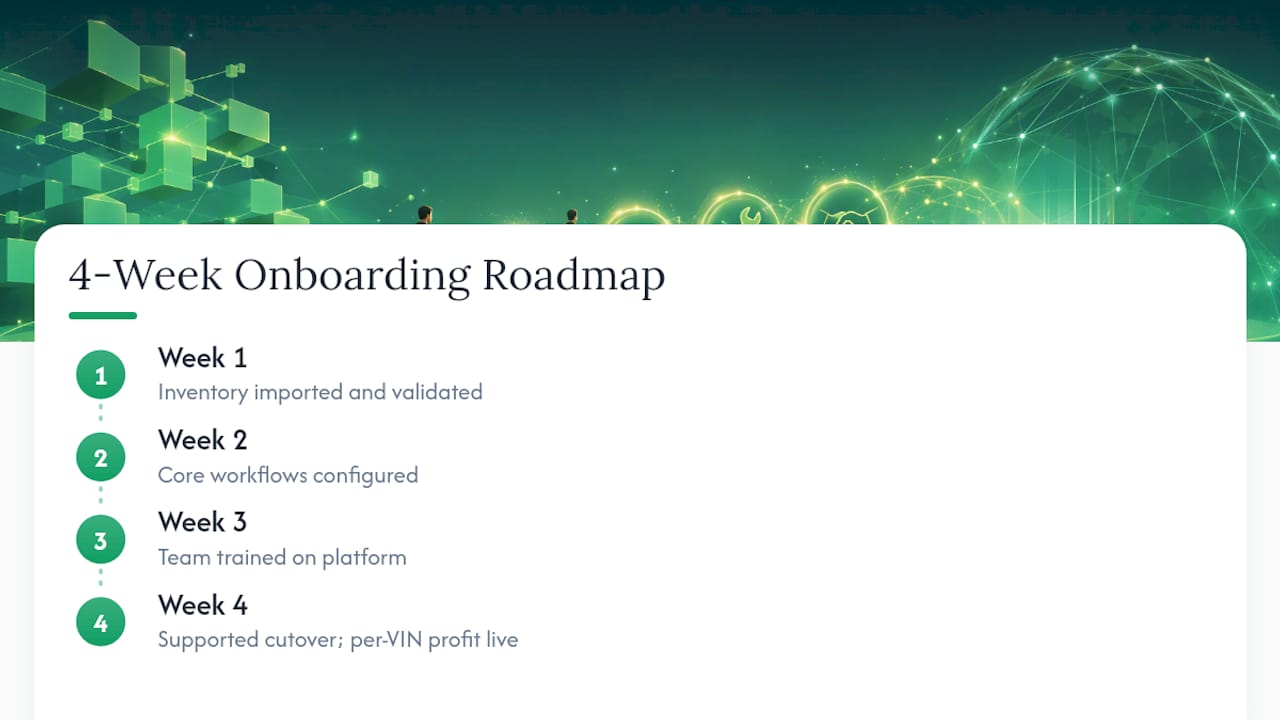
In your first 30 days, expect your inventory imported and validated in week one, core workflows configured by week two, your team trained by week three, and a supported cutover by week four, with per-car profit numbers visible the moment you go live. The Dealership Software Onboarding academy page walks through templates and checklists for each stage if you want the detail ahead of time.
Plans run $99 a month for the Flipper plan, $349 for Dealer, and $699 for Multi-Lot, each covering inventory, accounting, and CRM under one flat price with no add-on fees. Check the pricing page and pick the plan that matches your lot size, then request your free data import to start the clock on your own 4-week rollout.
Sources
For deeper detail on the practices covered here, review Forvis Mazars’ 10-step DMS conversion roadmap and Onboardly’s breakdown of why implementations take 90 days. Loturn’s deal paperwork automation guide and recon cost tracking guide expand on two of the steps above.
- Automotive Dealer Onboarding: Why DMS Implementations Still Take 90 Days (and How to Fix It) — Onboardly Blog
- Automotive Software Onboarding: DMS, Workshop & Dealer Network Adoption (2026)
- CRM implementation checklist for dealerships — AutoAlert
- AI in the Dealership Accounting Office: What It Can Do, What It Can’t, and Why the Difference Matters - Kruse Control Inc
FAQ
How Long Does Dealer Onboarding Really Take?
A focused pilot approach gets most independent dealers live in about four weeks, compared to the roughly 90 days a typical DMS conversion can take. The difference comes from automating data intake early and running training in short, role-based sessions instead of long generic ones.
What Data Do I Need to Prepare for a Fast Setup?
You need your current inventory export, invoices for purchase and recon costs, bank statements or login access, and your recent profit and loss statement. Gathering these before your first onboarding call is the single biggest factor in avoiding delays.
Does Loturn Offer Free Help With Data Migration?
Yes, Loturn includes free data import and dedicated onboarding support as part of getting a dealership set up. This covers moving inventory records and cost history so per-VIN profit tracking works from your first day live.
What Should I Check in the First 48 Hours After Going Live?
Verify inventory accuracy against your physical lot, confirm deals are moving smoothly from quote to signed paperwork, and check that your bank feed is reconciling correctly. Catching an issue in any of these three areas early prevents it from compounding into a larger problem later.
How Much Does Loturn Cost for a Small Dealership?
Loturn’s Flipper plan starts at $99 per month, with the Dealer plan at $349 per month and Multi-Lot at $699 per month for larger operations. Each plan includes inventory, accounting, and CRM tools with no separate add-on fees.